


Er ya da geç, pek çok oyuncu FACEIT hesaplarını nasıl sileceklerini araştırıyor ve hemen bir sürprizle karşılaşıyorlar: 'Hesabı Sil' seçeneği yok; arayüzdeki düğme. Platform, profilinizi ayarlar aracılığıyla kapatamayacağınız şekilde tasarlanmıştır. Desteğe başvurmanız gerekecek ve iki yol var: devre dışı bırakma - hesap genel erişimden gizlenir ancak sistemde varlığını sürdürmeye devam eder veya GDPR'nin tamamen silinmesi - veriler talep gönderildikten 30 gün sonra kalıcı olarak silinir.
Farkı önceden anlamak önemlidir çünkü seçiminiz hem doğrulama durumunuzu hem de yeni profil oluşturma yeteneğinizi etkiler. Her iki seçeneğin de katı bir kısıtlaması vardır: Herhangi bir hesap kapatma işleminden sonra, yeni bir hesap açmadan önce 6 aylık zorunlu bir bekleme süresi vardır.
Devre Dışı Bırakma ile Tamamen Silme Arasındaki Fark Nedir?
Herhangi bir şey yapmadan önce, gerçekte hangi sonuca ihtiyacınız olduğunu net bir şekilde belirtmeniz gerekir. Pek çok oyuncu, devre dışı bırakmayı tamamen silmeyle karıştırıyor; bunlar, farklı sonuçları olan farklı prosedürlerdir. Bunları karıştırmak size pahalıya mal olacaktır.
Parametre | Devre dışı bırakma | Silme (GDPR) |
FACEIT_##'in sistemindeki hesap | Kalıntılar | Silindi |
Bekleme süresi | 6 ay | 30 gün |
Doğrulama yayınlandı | Hayır | Evet (6 ay sonra) |
İptal edilebilir / yeniden etkinleştirilebilir | Evet 6 ay sonra | Sadece 30 gün içinde |
Kullanıcı adı silindi | HAYIR | Hayır (platform bunu korur) |
Elo ve istatistikler | Tutulan | Sıfırlanmadı |
Yeni hesap | 6 ay sonra | 6 ay sonra |
Ayrım temeldir. Devre dışı bırakma aslında bir dondurma işlemidir: profil aramadan kaybolur ve diğer oyuncular tarafından görünmez hale gelir, ancak teknik olarak hala mevcuttur. GDPR'nin tamamen silinmesi nihai bir karardır. 30 günlük bekleme süresinin ardından veriler geri dönüşü mümkün olmaksızın silinir.
Bir kritik nokta daha: Devre dışı bırakma doğrulamanızı iptal etmez. Aynı belgeyle yeni bir hesap kaydedemezsiniz; bu, GDPR'nin tamamen silinmesini gerektirir. Ve o zaman bile yeniden doğrulama ancak altı ay sonra mümkün olabilir.
Hesabınızı Silmeden Önce Nasıl Hazırlanırsınız?
FACEIT hesabınızı silmeden önce kişisel verilerinizi manuel olarak temizlemeniz mantıklı olacaktır. Bu gerekli bir adım olmasa da mantıklı bir adımdır; özellikle profil uzun süredir aktifse ve çok fazla bilgi eklenmişse. FACEIT bazı verileri yasal nedenlerden dolayı saklayacak, ancak ayak izinizi en aza indirmek sizin yararınıza olacaktır.
Destek ekibiyle iletişime geçmeden önce şunları kendiniz değiştirebilirsiniz:
E-posta – tarafsız bir adrese geçin
Kullanıcı adı – FACEIT mağazasında mevcuttur, maliyeti 1.000 puandır
Sosyal hesaplar – Bağlantıyı Ayarlar aracılığıyla kaldırın → Entegrasyon Ayarları
Telefon numarası – profilinizden kaldırın
Ülke – başka bir ülkeyle değiştirin
Verilerinizi temizledikten sonra devam etmeye hazırsınız. Bilmeye değer: Oyun Kimliğiniz ve Elo puanınız ayarlar aracılığıyla değiştirilemez veya sıfırlanamaz; bu bir platform kısıtlamasıdır. Steam bağlantınız yalnızca tam silme işlemi tamamlandıktan sonra otomatik olarak yayınlanacaktır. Kullanıcı adınız her durumda FACEIT tarafından tutulur; bu, adil rekabeti korumaya yönelik platform politikasıdır.
FACEIT Hesabınızı Nasıl Devre Dışı Bırakabilirsiniz – Adım Adım
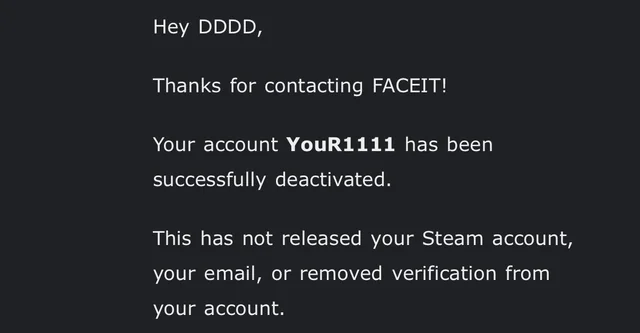
Devre dışı bırakma, FACEIT profilinizi herkese açık skinden kaldırmanın en hızlı yoludur. Profil, aramada görünmeyi bırakır ve diğer kullanıcılardan kaybolur. Süreç otomatiktir: Doğru kategoriye bir destek talebi göndermek, destek ekibinin manuel olarak incelemesine gerek kalmadan devre dışı bırakmayı tetikler.
Bunu nasıl yapacağınız aşağıda açıklanmıştır:
FACEIT hesabınızla support.faceit.com adresinde oturum açın.
İstekler bölümünde yeni bir bilet oluşturun.
Kategoriyi seçin: Hesap ve Oyun Yönetimi → Hesabım → Hesabımı devre dışı bırakın.
İsteği onaylayın; devre dışı bırakma, gönderildikten sonra otomatik olarak başlar.
Yeniden etkinleştirme mümkündür, ancak 6 ay geçmeden önce bu mümkün değildir; bu, 28 Şubat 2023'te FACEIT tarafından uygulamaya konan katı bir kuraldır. Pratik bir ipucu: Destek hesabınızdakie-posta, FACEIT hesabınızdakie-postadan farklıysa, bilet doğru şekilde işlenmez. Göndermeden önce adreslerin eşleştiğinden emin olun; aksi takdirde öncelikle uyumsuzluğu gidermeniz gerekir.
FACEIT Hesabınızı GDPR Kapsamında Tam Olarak Silme
Hesabınızın tamamen silinmesine ihtiyacınız varsa (doğrulamanız yayınlandıktan sonra hiçbir iz kalmazsa) ihtiyacınız olan şey GDPR prosedürüdür. Avrupa veri koruma kanunu uyarınca her kullanıcı, verilerinin platformdan tamamen kaldırılması hakkına sahiptir ve bu hak, nerede yaşadığınıza bakılmaksızın geçerlidir.
Süreç, devre dışı bırakma işleminden biraz daha uzundur ancak anlamlı derecede daha karmaşık değildir. Önemli olan ilk seferde her şeyi doğru bir şekilde doldurmaktır; aksi takdirde destek, isteği geri gönderecektir.
GDPR'nin silinmesine ilişkin adımlar:
support.faceit.com/hc/en-us/requests/new adresine gidin.
FACEIT hesabınıza kayıtlıe-postayı girin.
Kategoriyi seçin: Yasal Sorgular → Veri Koruma Haklarınızı Kullanın.
Gerekli alanları doldurun: profil kullanıcı adı, tam ad, doğum tarihi, telefon numarası, Oyun Kimliği ve oyun.
Konu alanına şunu yazın: 'Hesabımı sil'.
Açıklama alanına şunu yazın: 'Hesabımı silmek istiyorum'.
Şartları kabul ettiğinizi onaylayan kutuyu işaretleyin.
Gerekirse kimliğinizi doğrulamak için bir fotoğraf ekleyin.
Gönderimden sonra 30 günlük bir bekleme süresi başlar: Hesap zaten gizlidir ancak veriler henüz silinmemiştir. Bu, fikrinizi değiştirip destek ekibiyle tekrar iletişime geçerek isteği iptal edebileceğiniz penceredir. 30 gün dolduğunda hesabın kurtarılması mümkün değildir; veriler geri dönüşü mümkün olmaksızın silinir.
FACEIT Hesabını Silindikten Sonra Kurtarabilir misiniz?
Bu soru, halihazırda bir istek gönderen ve ikinci kez düşünen oyunculardan geliyor. İyi haberler var ama sadece hızlı davrananlar için. Bir GDPR silme talebinden sonra FACEIT hesabının kurtarılması mümkündür, ancak yalnızca 30 günlük bekleme süresi dahilindedir. Destek ekibiyle iletişime geçmeniz ve açıkça iptal talebinde bulunmanız gerekir, aksi takdirde süreç otomatik olarak tamamlanacaktır.
Bekleme süresi dolduğunda hesap gider ve geri dönüş olmaz. Hiçbir destek bildirimi bunu değiştirmeyecek; veriler silindi. Devre dışı bırakma işlemi farklı şekilde çalışır; geri alınabilir ve hesap geri yüklenebilir, ancak ancak 6 aylık sürenin tamamı geçtikten sonra.
Bu nedenle bir GDPR isteği göndermeden önce çok dikkatli düşünmeye değer. Emin değilseniz, devre dışı bırakmayla başlayın, bekleyin ve ancak bundan sonra tam silme konusunda son çağrıyı yapın.
Eski Hesabı Sildikten Sonra Yeni Bir FACEIT Hesabı Oluşturabilir misiniz?
FACEIT hesabını silmek ve yeni bir başlangıç yapmak isteyen çoğu oyuncu bunu hemen yapmayı bekler; Elo larını sıfırlayın ve temiz bir sayfa açın. FACEIT bu açığı kesin bir şekilde kapattı. Devre dışı bırakma veya silme işleminden sonraki 6 ay içinde yeni bir profil oluşturulmasına izin verilmez.
Bunu ihlal etmenin sonuçları platformun kurallarında açıkça belirtilmiştir:
Yeni hesap kalıcı bir yasak alır.
Ana hesap 12 ay süreyle engellendi.
Yeniden doğrulama tamamen kullanılamaz hale gelir.
Sistemi oyuna getirmeye çalışmak size beklemekten daha pahalıya mal olacaktır. Platform bu vakaları aktif olarak takip ediyor ve cezalar sıkı bir şekilde uygulanıyor. Eski FACEIT hesabınızı silip hemen yeni bir hesap oluşturmak, hiçbir zaman işe yaramayan ve hâlâ da yaramayan bir senaryodur.
Doğrulanmış bir hesabı silmek ve yeni bir hesabı doğrulamak isteyen herkes için; aynı hikaye. Aynı belgeyle yeniden doğrulama ancak silme tarihinden itibaren tam 6 ay sonra yapılabilir. Silahın üzerinden atlamak, platformdan kalıcı olarak çıkmak anlamına gelir.
FACEIT Hesabınızdan Steam Bağlantısını Nasıl Kaldırabilirsiniz?
Steam in FACEIT ile olan bağlantısının nasıl kaldırılacağı sorusu çoğunlukla aynı Steam profilini yeni bir hesapta kullanmak isteyen oyunculardan gelir. Oyun Kimliğinizin bağlantısını ayarlar aracılığıyla kaldırmak mümkün değildir; arayüzde böyle bir seçenek yoktur. Bu bir hata değil, kasıtlı bir platform kısıtlamasıdır.
Steam bağlantısı yalnızca hesabın tamamını silme işlemi tamamlandıktan sonra otomatik olarak yayınlanır: GDPR'nin silinmesiyle – 30 günlük bekleme süresi sona erdikten sonra; devre dışı bırakma ile - hesap teknik olarak sistemde kalır, dolayısıyla Steam bağlantısı yeni bir profile eklenemez. Steam hesabınızı başka bir yerde kullanma konusunda tam özgürlük, yalnızca GDPR'nin silinmesi ve zorunlu 6 aylık bekleme süresiyle sağlanır.
Hesabı Sildiğinizde Doğrulamanıza Ne Olur?
Doğrulama işleminize ne olacağı, baştan başlamak isteyen oyuncuların en sık sorduğu sorulardan biridir. Cevap tamamen hangi prosedürü seçtiğinize bağlıdır ve devre dışı bırakma ile silme arasındaki farkın en açık şekilde görülebildiği yer burasıdır.
Senaryo | Doğrulama işlemine ne olur? |
Hesabın devre dışı bırakılması | Doğrulama yayınlanmadı |
GDPR'nin silinmesi | 6 ay sonra serbest bırakıldı |
Yeni bir hesabı erken doğrulamaya çalışmak | Kalıcı yasak |
Sunucularda kimlik belgesi kopyası | 90 gün boyunca saklandı, ardından silindi |
Devre dışı bırakıldığında doğrulama yayınlanmaz: belgeniz "meşgul" olarak kalır; ve yeni bir hesap kaydetmek için kullanılamaz. GDPR'nin tamamen silinmesiyle, kimlik belgenizin bir kopyası işlemden sonra 90 gün boyunca FACEIT'ın sunucularında tutulur ve ardından otomatik olarak silinir. Yeniden doğrulama, silme tarihinden tam olarak 6 ay sonra kullanılabilir hale gelir.
Yeni Başlayın – Ama İyice Düşünün
Destek talebi göndermeden önce bir soruyu net bir şekilde belirtin: Devre dışı bırakmaya mı yoksa tamamen silmeye mi ihtiyacınız var? Amaç sadece eski profili gizlemek veya ara vermek ise devre dışı bırakma yeterlidir. Doğrulamanızı veya Steam hesabınızı boşaltmanız gerekiyorsa – yalnızca GDPR ve yalnızca altı ay beklemeye hazırsanız.
Altı ay uzun bir süre. Ancak bu süre zarfında CS2 skin pazarını keşfedebilir, sağlam bir inventory oluşturabilir ve uygun şekilde hazırlanmış yeni bir FACEIT sezonuna gelebilirsiniz. Aceleyle yeni bir profil oluşturmak, kalıcı olarak yasaklanma riskine girmek anlamına gelir; bu, kazanacağınız zamandan çok daha büyük bir kayıptır.
