Steam API Scam – это вид мошенничества, при котором злоумышленники получают доступ не просто к API-ключу, а к вашей Steam-сессии или аккаунту, после чего могут создать или использовать Steam Web API key для подмены трейдов. API-ключ – это ключ для доступа к Steam Web API. Сам по себе он не является паролем от аккаунта, но вместе с украденной сессией Steam может использоваться для отслеживания торговых предложений и подмены обменов. Мошенники используют его для подмены трейдов, в результате чего ваши предметы могут быть украдены в момент совершения обмена с другом или даже проверенным маркетом скинов.
Как крадут данные с помощью Steam API Scam?
Чаще всего это делают фишинговые сайты, которые крадут ваши данные в момент, когда вы логинитесь на них с использованием Steam. Это могут быть сайты-двойники легитимных платформ или маркетов, а также любые другие сайты, якобы предоставляющие полезные инструменты или аналитику для игроков.
Сейчас схема стала шире: мошенники могут использовать не только форму для логина и пароля, но и поддельный QR-вход, вредоносные расширения браузера, фейковые окна Steam, а также угнанные аккаунты друзей, которые рассылают ссылки от имени знакомого человека. Поэтому опасность не всегда выглядит как очевидный “левый сайт” – иногда всё начинается с обычного сообщения в Steam, Discord или другом чате.
Наткнуться на них вы можете сами, воспользовавшись поисковиком (именно поэтому мы категорически не рекомендуем переходить по первым ссылкам с оплаченной рекламой и вообще советуем сохранить наш сайт в избранное, чтобы избежать перехода на фейк). Но нередко в этой схеме задействованы и обычные пользователи Steam, которые могут предложить вам перейти по их ссылке и выполнить определенное действие:
зарегистрироваться на участие в турнире по любимой игре;
проголосовать за “созданный ими” предмет в Мастерской и т.д.
Также часто встречаются ссылки на “проверку скина”, “верификацию аккаунта”, “ошибочный репорт”, “голосование за команду” или “безопасный трейд”. Если подобное сообщение пришло даже от знакомого, лучше сначала убедиться, что его аккаунт не был взломан.
Как защититься от Steam API Scam?
Чтобы распознать мошенничество со Steam API, важно оставаться бдительным. Попав на сайт, вы в большинстве случаев даже не заподозрите, что он используется в мошеннических целях: он может выглядеть идентичным оригиналу (если это сайт-двойник) или вполне надежным (если мы говорим о других схемах).
Поэтому вы без каких-либо сомнений начнете листать сайт и в какой-то момент, для использования определенного функционала, вам потребуется авторизоваться через Steam. Вот здесь и будет крыться основное отличие надежного сайта от мошеннического.
Если вы предварительно авторизовались в Steam в браузере, то:
Не мошеннический сайт: Перенаправит вас на официальный домен Steam для входа через Steam OpenID. Если вы уже вошли в Steam в этом браузере, обычно достаточно подтвердить вход кнопкой “Войти”, без повторного ввода логина, пароля или сканирования QR-кода.
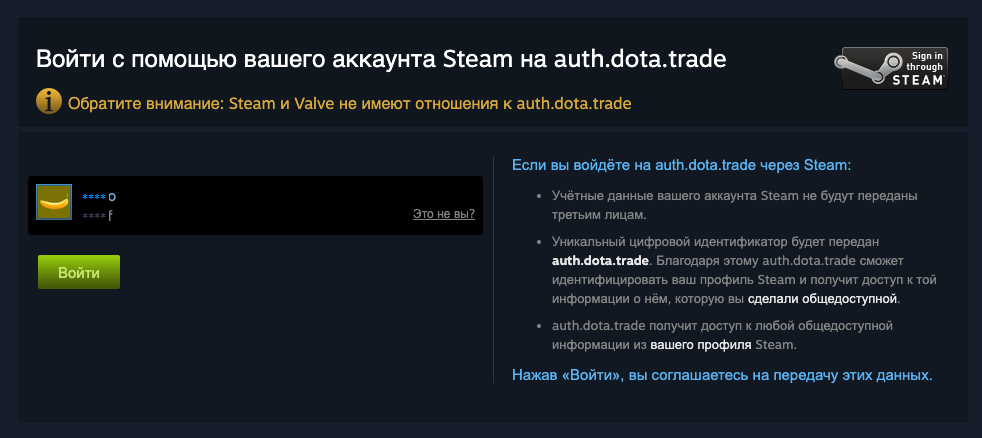
Мошеннический сайт: Покажет поддельное окно входа, попросит ввести данные от аккаунта прямо на своей странице или предложит отсканировать QR-код, который на самом деле подтверждает вход не вам, а злоумышленнику. Сам QR-вход Steam безопасен только на официальном домене Steam, но на фишинговом сайте он превращается в способ украсть вашу сессию.
Если вы введете свои данные или подтвердите QR-вход на фишинговой странице, злоумышленники могут получить доступ к вашей Steam-сессии.
Что такое API-ключ, API token и ссылка на обмен?
В разговорах о Steam API Scam часто используют слова “API key”, “API token”, “токен” или “ключ”, но важно понимать разницу. Steam Web API key – это ключ, который создаётся на официальной странице Steam Web API Key. Сессионные токены и cookies – это данные авторизации, которые появляются после входа в аккаунт. Если мошенники украли сессию через фишинг, поддельный QR-код или вредоносное расширение, они могут действовать от имени аккаунта даже без знания вашего нового пароля до тех пор, пока сессия не будет сброшена.
Trade URL или ссылка на обмен – это отдельная вещь. Сама по себе она не даёт мошенникам доступ к аккаунту и не позволяет украсть предметы без подтверждения, но если аккаунт уже скомпрометирован, старую ссылку на обмен лучше сменить вместе с паролем и API-ключом.
Как работает Steam API Scam?
После компрометации аккаунта или сессии у вас может быть создан ключ Steam API на официальной странице Steam Web API Key (https://steamcommunity.com/dev/apikey), причем вы этого не заметите, ведь в Steam не предусмотрено какое-либо уведомление пользователя в таких ситуациях.
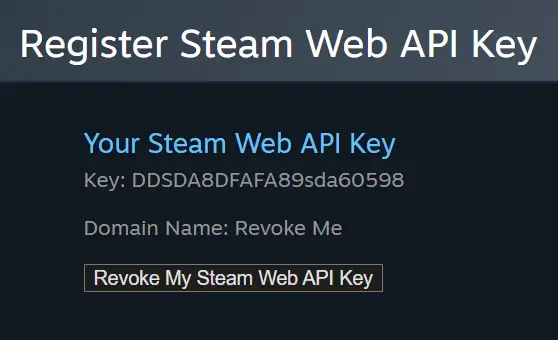
А затем – ничего. По крайней мере, в первое время и при обычных сценариях Steam API Scam. Вы продолжите заниматься своими делами, играть в любимые игры и т.д. И только когда вы решите обменять свои предметы (а это может случиться, например, и через несколько дней или месяцев), мошенники смогут украсть ваши предметы через Steam API Scam через подмену трейда.
При отправке предметов другу/маркету/на другой свой аккаунт, мошенники могут отследить созданный обмен, отменить оригинальный трейд и создать новый – уже на своего бота-имитатора. Если вы посмотрите на историю трейдов в аккаунте, то увидите там два предложения обмена с одинаковыми предметами – одно из них для реального адресата, а другое – для мошеннического бота. К тому же более продвинутые мошенники могут использовать информацию из аккаунта пользователя и подменять аватарку или другие данные бота, чтобы он был похож на настоящего адресата. Как только вы примете трейд, ваши скины будут отправлены мошенникам, а не тому, кому вы хотели их передать.
Такой тип атаки Steam описывает как подмену или перенаправление обмена: пользователь думает, что подтверждает трейд с доверенным аккаунтом, но фактически отправляет предметы аккаунту-имитатору.
Что изменилось после появления Trade Protection?
Для CS2-предметов Steam добавил механизм Trade Protection. После обмена такие предметы находятся под защитой 7 дней: их можно использовать в игре, но нельзя передавать дальше, модифицировать или расходовать. Если аккаунт был скомпрометирован и предметы ушли через мошеннический обмен, пользователь может отменить сделки с защищёнными предметами в течение этого срока через историю обменов.
Важно: Trade Protection – это последний шанс, а не замена внимательности. При отмене защищённых сделок Steam возвращает предметы участникам обмена, но аккаунт получает ограничение на торговлю и использование Community Market на 30 дней. Поэтому лучше не доводить ситуацию до реверса, а проверять трейд до подтверждения в мобильном аутентификаторе.
Как проверить свой аккаунт и защититься от мошенничества с API-ключом при обмене?
В первую очередь советуем проверять наличие сгенерированного API-ключа. Еще раз, сделать это можно на официальной странице Steam Web API Key: https://steamcommunity.com/dev/apikey. По умолчанию его у аккаунта нет, поскольку для отправки трейдов и других обычных действий в аккаунте он не нужен.
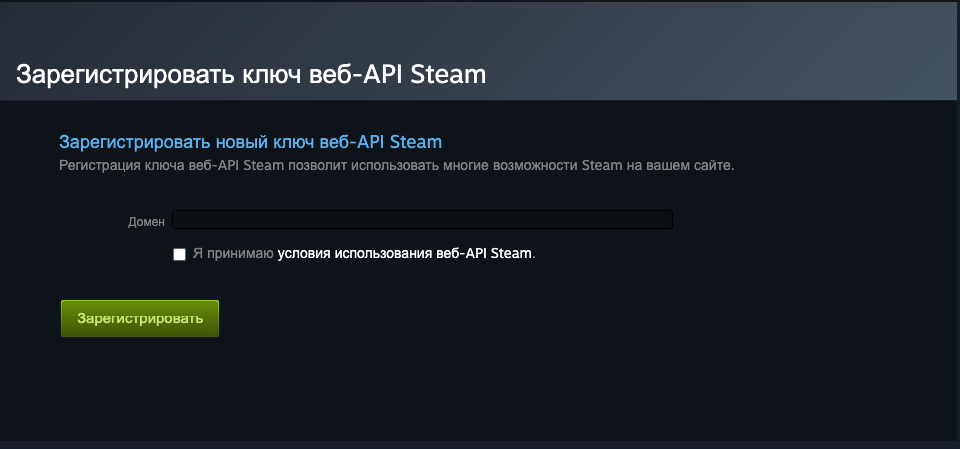
Если ключ есть и он был создан без вашего ведома, немедленно удалите его и смените пароль, чтобы защититься от подмены трейда в Steam.
Но сейчас одного удаления API-ключа уже недостаточно. Если вы вводили данные на подозрительном сайте или подтверждали QR-вход, нужно считать, что могла быть украдена вся Steam-сессия. В таком случае удалите API-ключ, смените пароль Steam, смените пароль от почты, выйдите со всех устройств, проверьте Steam Guard и только после этого меняйте ссылку на обмен.
Также для возврата полного контроля над вашим аккаунтом Steam мы советуем сменить вашу ссылку на обмен. Сделать это можно здесь.
Когда вы продаете предметы нашему боту, мы также уведомим вас, если наш обмен с вами будет отменен. Мы не можем гарантировать, что раньше мошенники не получили доступ к вашему API-ключу, сессии или другому инструменту подмены, но делаем всё, чтобы вы могли распознать фейковый обмен.
Если ваш обмен будет отклонен Steam, вы увидите предупреждающую табличку на нашем сайте (см. скриншот ниже) и услышите звуковой сигнал.
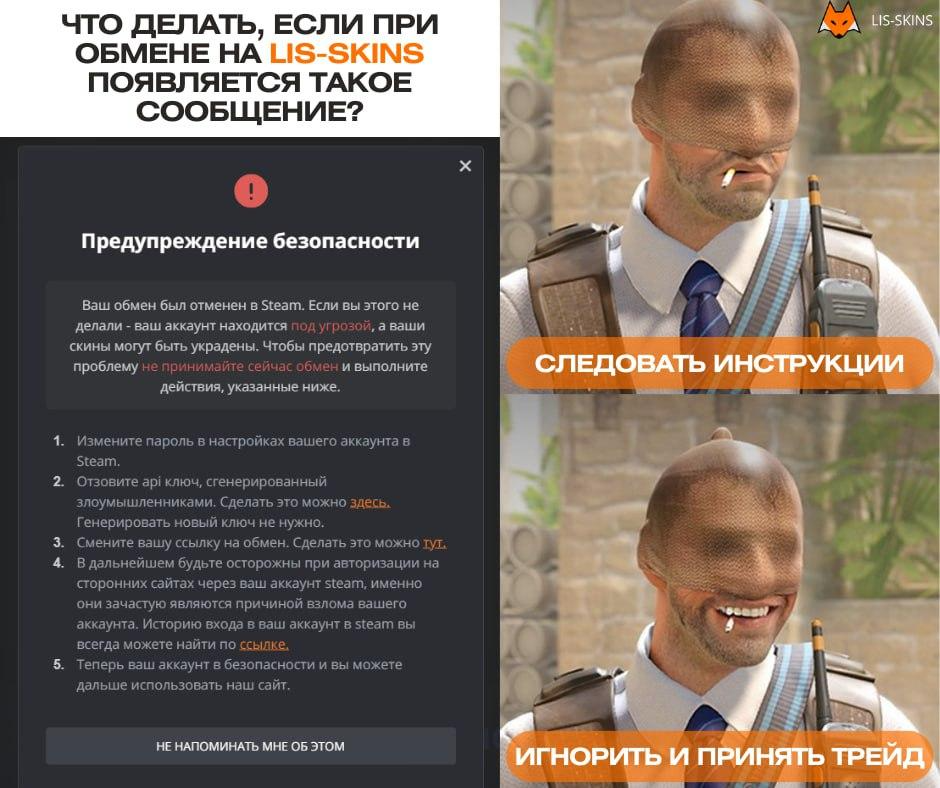
Ни в коем случае не спешите подтверждать обмен в мобильном аутентификаторе – сначала проверьте данные бота, которому отправляете предметы (имя, уровень, аватар, дату регистрации). Если мошенники пытаются подменить обмен, эти данные могут отличаться.
Проверьте последние предложения обмена истории обменов Steam: https://steamcommunity.com/id/(ваш логин)/tradeoffers/. Если вы видите последними два одинаковых предложения, одно из которых отменено, значит мошенники подменили трейд. Если вы его примите, ваши предметы будут отправлены не нашему боту.
Также советуем оформлять сделку через браузер компьютера, тогда вы сможете открыть одновременно сайт и мобильный аутентификатор, а значит, проконтролировать обмен будет проще.
Если вы уже подтвердили подозрительный трейд с CS2-предметами, сразу проверьте историю обменов и наличие Trade Protection. Если сделка ещё находится в 7-дневном защищённом периоде, её можно попытаться отменить через инструменты Steam. Но сначала обязательно защитите аккаунт: смените пароль, удалите API-ключ, завершите активные сессии и проверьте компьютер на вредоносные программы.
Как защититься от скама с API-ключом?
Вот несколько дополнительных рекомендаций, которые помогут вам защитить аккаунт Steam от мошенников и безопасно обменивать скины.
Всегда проверяйте подлинность сайтов, на которых требуется авторизация через Steam, проверяйте, не попали ли вы на фишинговый сайт. Часто ссылка в адресной строке может отличаться от оригинальной одной-двумя буквами.
Перед входом через Steam проверяйте не только внешний вид страницы, но и домен в адресной строке. Настоящая авторизация Steam должна проходить через официальный домен Steam, а не через встроенное окно на стороннем сайте.
Будьте осторожны, когда общаетесь с пользователями, которых не знаете лично. Осторожно относитесь к ссылкам, которые они вам присылают. Поищите информацию о них, прежде чем переходить по ним или совершать какие-то действия на этих сайтах.
Steam уже добавил предупреждения о подозрительных сообщениях в личных чатах и возможность жаловаться на такие сообщения прямо из окна переписки. Но отсутствие предупреждения не означает, что ссылка безопасна: фильтры не могут поймать все фишинговые схемы.
Будьте внимательны к подозрительным предложениям, например, участию в турнирах или обменах с незнакомыми людьми.
Будьте осторожны, если кто-то пишет вам от имени службы поддержки Steam и предлагает отправить ваши предметы другу или на другой аккаунт. Часто используется аргументация, что это необходимо, чтобы сохранить их при прохождении “верификации” вашего аккаунта, поскольку у вас в профиле есть “ворованные предметы”. Настоящие сотрудники службы поддержки не станут добавляться к вам в друзья и писать в чат. Если вы увидели в вашем профиле уведомление, что он на проверке, и вам пришло подобное сообщение от “поддержки”, знайте, у мошенников уже есть доступ к вашему аккаунту.
Steam Support не просит передавать предметы на “безопасный аккаунт”, не проводит проверки через личные сообщения и не требует отправлять скины другу, боту или на другой профиль. Любая такая просьба – признак скама.
Не устанавливайте сомнительные расширения браузера для трейдов, “автоподтверждений”, проверки цен или улучшения маркета. Вредоносные расширения могут подменять страницы, читать данные браузера и помогать мошенникам получать доступ к активной сессии.
Регулярно проверяйте наличие API-ключа и следите за подозрительной активностью в своем аккаунте.
После любого подозрительного входа не ограничивайтесь проверкой API-ключа. Проверьте почту, Steam Guard, активные устройства, историю обменов и ссылку на обмен. Если есть сомнения – смените пароль и выйдите со всех устройств.
Когда передаете кому-то предметы, внимательно проверяйте, кому отправляете трейд.
Используйте только проверенные сторонние сайты для продажи или обмена скинов.
И главное – не рассчитывайте на Trade Protection как на основной способ защиты. Он может помочь после мошеннического обмена с CS2-предметами, но безопаснее остановить подмену до подтверждения трейда в мобильном аутентификаторе.