
I used to always buy on dmarket as the prices were below the market. Now I buy all skins here. In addition, the prices are cheaper and you can choose the float of the skin. Wrote to tech support to add the ability to select the mantel for arcana on tb half a year ago. Added that feature. Sold a couple expensive skins on dmarket the other day and couldn't withdraw the money. There KYC was referenced 10 times and deliberately prevented me from withdrawing. But here I was able to withdraw money to my account within 5 minutes. True, the prices are cheaper. But I am willing to put up with it, because I understand that to sell cheaper than the market they must buy even cheaper. I recommend.
I have not seen a better site on the screens, withdraw money/skins quickly without cheating, already bought/sold a lot, everything is clean and normal!
Very cool site, convenient and reliable . But there are misfires on the withdrawal of money to the card. There are failures and the money may not come 2 or 6 hours. But so everything is good.
decided to take a risk and sell skins here, the amount was large...easy registration, 5 minutes of nervous waiting, but everything went smoothly.finances came to the card. thanks a lot fox)))))
20 out of 10 )
quietly buy here, prices are relatively low, there are lower, but there are no guarantees there :) on the fox take skins and 10000+ rubles not worrying about the money, all advise the site, the speed of shipment is also very high
The best site for selling and buying skins, I have not seen better. Always quickly bought and sold, but the commission is large someone will think but the admin also want to eat want to eat
We know that the eight-day wait due to Steam Trade Protection rules can feel too long and tiring.
That’s why we’ve introduced two new options that let you sell your skins and use the funds immediately, with no delays or restrictions:
Instant Sale – get funds credited to your balance instantly to buy new skins right away. Instant Payout – withdraw funds to your card or crypto wallet right after confirming the trade.
Want to learn more? Just keep moving on — we'll show you everything.
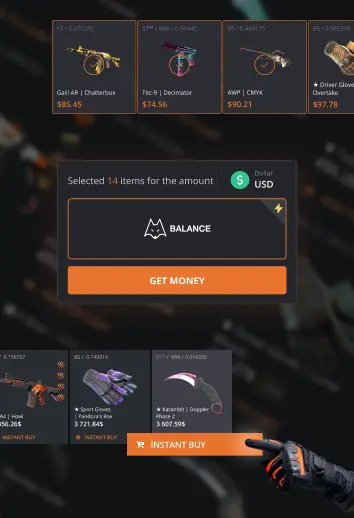
Buy without waiting
Now you can spend money from skin sales immediately. Select to have the funds credited to your balance, and they will be available for CS2 purchases immediately after the transaction. Just three simple steps:
1
Sell your skins
Select balance credit when selling
2
Instant crediting
Funds will be credited immediately after a successful skin transfer – no Trade Protection delay.
3
Buy instantly
Use your available balance to buy CS2 skins right after it’s credited.
What if I don't spend the funds within 8 days?
If the transaction is not canceled, you will be able to withdraw funds in addition to making CS2 purchases on the website.
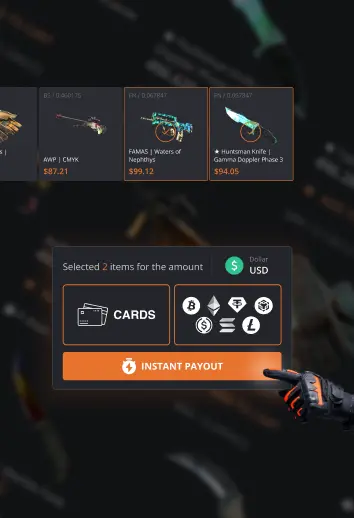
Instant Payout
You can now withdraw money from skin sales immediately – no need to wait for the 8-day Steam Trade Protection hold to end.
Instant Payout is available if:
Verification KYC is completed (available for ages 18+);
Total sales volume on the site is at least $50;
The withdrawal is within your current limit.
How it works:

1
Sell your skins
Choose a payout method.
2
Get paid instantly
The funds will be sent to your selected method after the successful transfer of skins.
The payout is not divided into parts.
If the transaction is within your limit, the full amount is paid immediately.
If the transaction amount exceeds your limit, the payout will be made in 8 days.
Awesome news! You’ve just unlocked Instant payouts and now you can receive money from skin sales straight to your card, crypto wallet, or other methods without waiting for the Steam Trade Protection to end.