


Float in CS2 and CS:GO is a number between 0 and 1 that sets how worn a skin looks: the closer to zero, the cleaner the weapon. To check a skin's float in CS2, open the item in your inventory, click Inspect and then the info icon, which shows the exact Wear Rating. On LIS-SKINS the float is listed next to every offer on a skin's page, and you can sort offers by float or filter them by a float range. Below is a short explanation of the value, the wear range table and step-by-step ways to check float before buying and before selling.
What Float Is in CS:GO and CS2, in Short
The float value (Wear Rating) is a decimal number assigned to a skin the moment it is created: when it drops from a case, comes out of a trade-up contract or arrives as a drop. It does not change no matter how much you play with the weapon, and it worked the same way in CS:GO as it does in CS2. Our guide to how skins wear in CS2 explains why, and the basic definition is covered in what float is for CS:GO skins.
The float value determines the wear name you see in your inventory and on the market. The boundaries are the same for every skin:
| Wear | Short | Float range |
|---|---|---|
| Factory New | FN | 0.00 to 0.07 |
| Minimal Wear | MW | 0.07 to 0.15 |
| Field-Tested | FT | 0.15 to 0.38 |
| Well-Worn | WW | 0.38 to 0.45 |
| Battle-Scarred | BS | 0.45 to 1.00 |

Within one wear the look still varies: a skin at 0.99 looks noticeably more battered than one at 0.46, even though both are labeled Battle-Scarred. Many skins also have a capped float range. For example, AK-47 | Redline only exists between 0.10 and 0.70, so there is no Factory New version. The full order of wears and what each one looks like is covered in our article on CS2 skin quality and wear in order.
How to Check Skin Float in CS2 In-Game
CS:GO had no built-in way to see the exact number, so players relied on third-party services. CS2 shows the float right in the item inspect screen:
Launch CS2 and open the Inventory tab.
Click the skin and choose Inspect.
In the inspect view, click the info icon "i" in the lower left corner.
The panel shows the exact Wear Rating (that is the float) and the Pattern Template number.
The same works for listings on the Steam Community Market: each listing has an "Inspect in Game" button that launches CS2 and opens the same screen with the info panel. The Pattern Template number matters for skins whose price depends on the pattern; see our overview of rare patterns in CS2.
You can also check the float of an item in someone else's inventory: if the owner's inventory is public, the item has the same inspect option on their Steam profile. You do not need any extra software or browser extensions for this, and you should never enter your Steam login on an outside website just to check a float.
How to See Float on LIS-SKINS Before You Buy
On LIS-SKINS you see the float before you pay, with no need to launch the game. On any skin's page, every offer in the list shows its exact float value and a color bar that marks where that copy sits within its wear range. To find the right copy quickly, use the tools above the list:
Sort by Float. Sort by float ascending and the cleanest copies come first. Descending puts the most worn copies on top, which is handy for skins that look good with high wear.
"Float from" and "Float to" filter. Set your own range, for example 0.15 to 0.18, and only copies near the bottom of Field-Tested remain.
Compare with price. The price sits next to the float, so you see right away what a cleaner copy of the same wear costs.
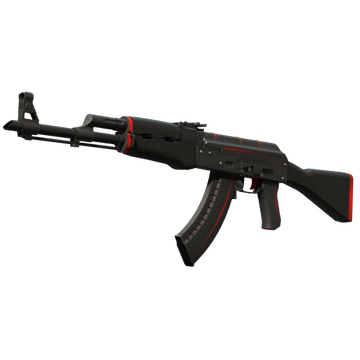
Take AK-47 | Redline as an example: Minimal Wear currently costs around $130, while Field-Tested starts from $25. Open the Field-Tested page sorted by float and the first copies sit at about 0.150, right at the MW boundary. They look closer to Minimal Wear but are still priced as FT. The lowest values on the market are collected in our list of skins with the lowest float in CS2, and how to balance float against budget and style is covered in how to choose a skin in CS2.
How to Check the Float of Your Skins Before Selling
Before you sell, it helps to know the exact float of each skin in your inventory. The simplest way is the CS2 inspect screen described above. Buyers often search specifically for copies near the bottom of their wear (for example 0.07x for Minimal Wear or 0.15x for Field-Tested), so there is little reason to list such a skin at the cheapest price for its wear. The opposite also happens: on some skins high wear is valued for its distinctive look.
To estimate the total value of your items before selling, see how to find out the value of your CS:GO inventory. On LIS-SKINS you can sell skins instantly and withdraw real money.
How Float Affects a Skin's Look and Price
The higher the float, the more scuffs, scratches and chips: the paint fades, the metal darkens and parts of the design wear off. How strong the effect is depends on the skin. On some, the gap between Factory New and Field-Tested is obvious at a glance; on others, wear is barely visible and shows up only as slightly duller colors.
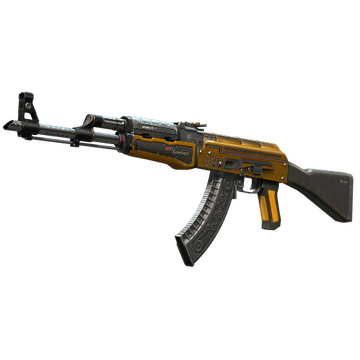
That is why the cleanest copy is not always the best buy. If wear barely shows on a given skin, a low-float Field-Tested copy looks almost like the pricier wears for a fraction of the cost. Price is not set by float alone: rarity, collection, StatTrak and, on some finishes, the pattern all play a part, so check float together with those factors.
FAQ
How do I check a skin's float in CS2?
Open the skin in your CS2 inventory, click Inspect and then the "i" icon in the lower left corner: the panel shows the Wear Rating, which is the float. On LIS-SKINS the float is listed for every offer on the skin's page.
Could you see float in CS:GO?
CS:GO itself did not display the exact value; players looked it up through third-party services. When the game moved to CS2, inventories carried over with their floats, and the number is now shown right in the inspect screen.
Does a skin's float change over time?
No. The float is set once when the item is created and does not rise with play, kills or time. A Factory New skin stays Factory New forever.
How do I find a low-float skin on LIS-SKINS?
Open the page for the skin and wear you want, sort by Float ascending or enter a range in the "Float from" and "Float to" fields. The cleanest copies come first, with their prices.
