


You cannot give yourself a skin in CS:GO in a way that puts it in your Steam inventory and shows it in regular matches. Programs and "bots" that promise this either do not work or steal your account. There are two legitimate ways to see a weapon or knife in game: on your own local server with bots through the console (sv_cheats 1 plus give commands), or on community servers with the !ws plugin, where the skin is visible to you and the players on that server. A real skin can only reach your inventory from a case, a trade, a trade-up contract or a purchase on a marketplace.
Below are the commands for weapons and knives, the knife method that worked in CS:GO, and how to find skin servers. If you play CS2, the up-to-date guide is how to give yourself a skin in CS2.
A word of caution first. Search results are full of "guides" and "life hacks" about a mysterious program that adds a knife with a skin that everyone can see and Steam never bans. No such tool exists: skins are tied to your Steam inventory on Valve's servers, and selling them is the core of Valve's business model. Downloads that promise otherwise are usually broken or built to steal your account and its items.
Getting Weapons Through the Console
Let's start with firearms and then move on to knives. These commands only work with sv_cheats 1, so they are meant for practice with bots on a local server where you are the host.
You will need the developer console: enable it in the game settings. By default it opens with the tilde key (~).
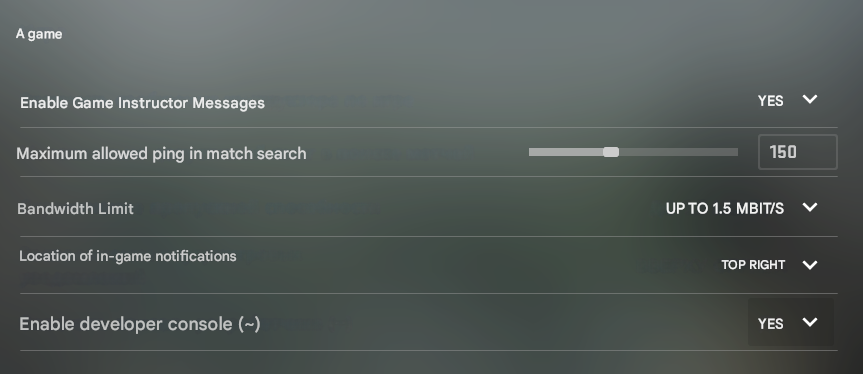
The first command to enter is sv_cheats 1.

It unlocks all the other commands available in the game. Now, to get any weapon, type the matching command in the console. The full list of other console commands is in a separate article.
| Weapon | Command |
|---|---|
| AK-47 | give weapon_ak47 |
| AUG | give weapon_aug |
| AWP | give weapon_awp |
| Dual Berettas | give weapon_elite |
| Desert Eagle | give weapon_deagle |
| Famas | give weapon_famas |
| Five-SeveN | give weapon_fiveseven |
| G3SG1 | give weapon_g3sg1 |
| Galil-AR | give weapon_galilar |
| Glock 18 | give weapon_glock |
| M249 | give weapon_m249 |
| M4A4 | give weapon_m4a1 |
| M4A1-S | give weapon_m4a1_silencer |
| MAC-10 | give weapon_mac10 |
| MAG-7 | give weapon_mag7 |
| MP-7 | give weapon_mp7 |
| MP-9 | give weapon_mp9 |
| Negev | give weapon_negev |
| Nova | give weapon_nova |
| P2000 | give weapon_hkp2000 |
| P250 | give weapon_p250 |
| P90 | give weapon_p90 |
| Sawed-Off | give weapon_sawedoff |
| Scar-20 | give weapon_scar20 |
| SG-553 | give weapon_sg553 |
| SSG-08 | give weapon_ssg08 |
| Tec-9 | give weapon_tec9 |
| UMP-45 | give weapon_ump45 |
| USP-S | give weapon_usp_silencer |
| XM-1014 | give weapon_xm1014 |
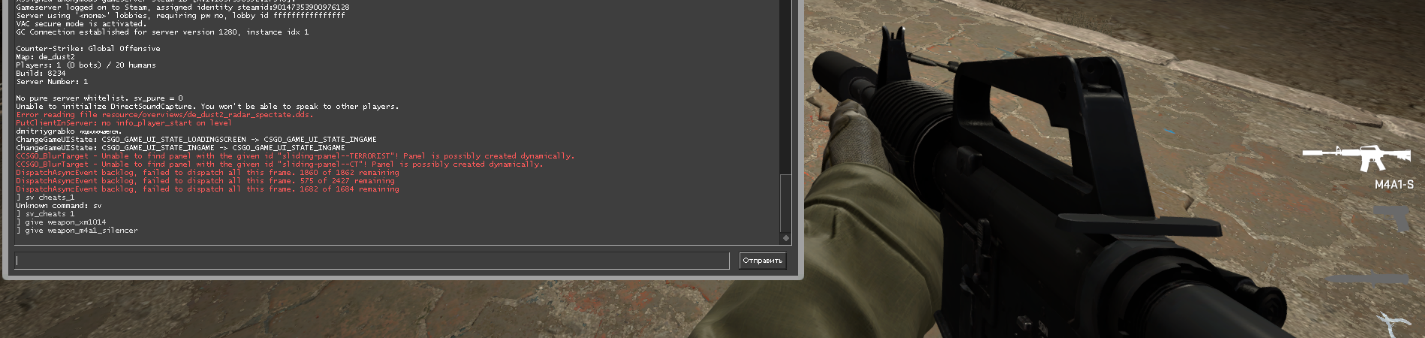
Knives do not work this way, so the process for them is described in more detail below.
How to Give Yourself a Knife with a Skin Through the Console
The method below worked in CS:GO. In CS2 the weapon_knife.txt file no longer exists and knives on your own server are given differently, as explained in how to give yourself a knife in CS2. Editing game files can also be treated as tampering with the client, so do not do it on your main account. Knives obtained this way only work in a local lobby: in CS:GO, joining matchmaking with the edited file triggered a MeleeWeapon error.
The process looks like this:
Open the game folder and go to steamapps/common/Counter-Strike Global Offensive/csgo/scripts.

Find the weapon_knife.txt file and open it in Notepad or Notepad++.
Find the MeleeWeapon line, replace the value 1 with a dot (.) and save the file.
Then launch the game and create your own practice server. Make sure you are the admin of the local lobby so nobody else can join.
If everything worked, open the console and enter two commands one after another:
sv_cheats 1
mp_drop_knife_enable 1

Now you can drop your knife and pick up another one. To spawn a specific model, use the commands from the table:
| Knife | Command |
|---|---|
| standard counter-terrorist knife | give weapon_knife_ct |
| standard terrorist knife | give weapon_knife_t |
| bayonet knife | give weapon_bayonet |
| folding knife | give weapon_knife_flip |
| hook blade knife | give weapon_knife_gut |
| karambit | give weapon_knife_karambit |
| M9 bayonet knife | give weapon_knife_m9_bayonet |
| hunting knife | give weapon_knife_tactical |
| butterfly knife | give weapon_knife_butterfly |
| falchion | give weapon_knife_falchion |
| golden knife | give weapon_knifegg |
| bowie knife | give weapon_knife_survival_bowie |
| poking knives | give weapon_knife_push |
For experiments like this, use a second account and remember to restore the original file afterward: Valve may treat modified game files as an attempt to hack the game.
Servers That Give Skins in CS:GO and CS2
This option suits anyone who is considering a new weapon or knife skin and wants to look at it in first person before buying.
That is what community servers with skins are for. They are unofficial and still work in CS2. They run a special plugin that lets you inspect any skin up close for as long as you like. This is completely legal and the game does not treat it as a cheat.
To find one, open the community server browser and search for these tags:
!skins
!ws
!knife
!gloves
!gl
Some of these servers are abandoned or unstable, so you may need to try a few. We covered knives on such servers in more detail in this article. And if you like a skin, you can buy it on LIS-SKINS: then it sits in your inventory and shows up in every match.
