


The May 24 update added several important changes to CS2. The maps were improved, especially Vertigo, some rewards and the cost of weapons were adjusted, the height and spread of the flames of incendiary grenades and Molotovs were reduced. However, one of the most talked about innovations is the skin rental, which allows you to get some cosmetic items for a limited time. Let's figure out how it works.
What Skins Can Be Rented?
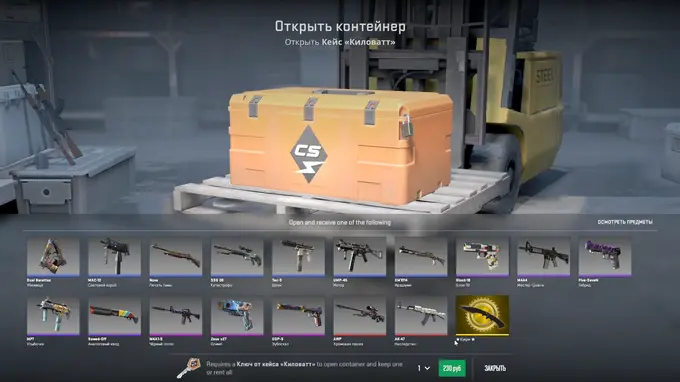
For now, the function is only available for skins from the Kilowatt Case. By using the rental, the player will receive all items from the container, except knives. It is possible that in the future Valve will extend this feature to other cases, but this depends on how successful the innovation turns out to be.
How Much Does It Cost to Rent Skins?
Renting skins costs the same as opening the “Kilowatt” case: you will need to get the case itself (buy or wait until it appears in the game) and purchase a key for it. The price of the case varies depending on demand. After the update, it increased and is about $0.14. The key can be purchased in the game, and it has a fixed cost – $2. It turns out that if you received the case for free, the rental will be available for the price of the key.
For How Long Are Skins Issued?
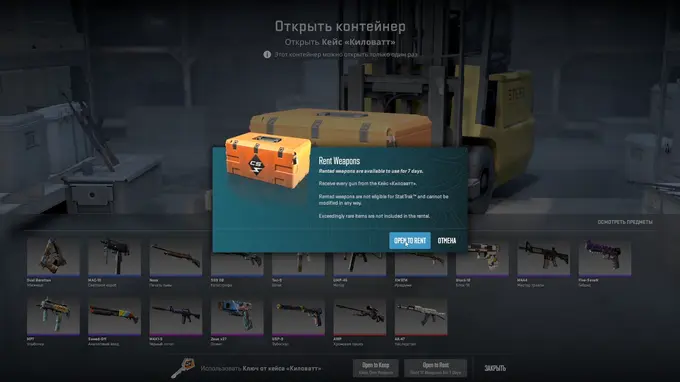
Skins appear in the inventory for a week. They can be used in any matches. After seven days, they will change to standard ones.
What Restrictions Are There for Rented Skins?
Skins received for rent cannot be sold or exchanged. You also cannot customize weapons using stickers and name tags. Skins will definitely not have a StatTrak module.
How to Use Skin Rental?
To rent skins, select the appropriate option when opening the “Kilowatt” case.
When Should You Use Skin Rental?
If you're not sure whether you want to spend money on any of the skins included in the case, you can rent them for a week to see how they look in the game. After this, you can purchase the necessary skins separately on LIS-SKINS at better prices than on the official trading platform.
