


A Steam API key (Steam Web API key) is an access key for the Steam Web API. By default your account does not have one, and a regular player does not need it. This guide explains what a Steam API key is, where to find it and how to check it, how to remove or revoke it, and what the Steam API scam is — a scheme where attackers use a stolen session to create such a key and swap your trades to steal your skins. Below is a step-by-step on how to check your account, lock it down, and avoid losing items in a trade.
What a Steam API key is
A Steam Web API key is created manually on the official Steam Web API Key page. On its own it is not your account password, but combined with a stolen session it is used to track trade offers and swap trades. Do not confuse three different things:
Steam API key (Steam Web API key) — created manually on the developer page; by default there is none.
Session tokens and cookies — the authorization data created after you log in. If they are stolen through phishing, a fake QR login or a malicious extension, an attacker can act as your account until the session is reset.
Trade URL — a separate thing: on its own it gives no account access, but if the account is already compromised, change it along with your password and API key.
Where to find your Steam API key
You can find and check the API key on the official page: steamcommunity.com/dev/apikey. If you have no key, you will see a form to register a new key with a Domain Name field and a terms checkbox. For a regular player this is the normal state — there should be no key.

If the page instead shows an existing key and domain, a key has already been created. If you did not do it yourself, treat it as a sign your account has been compromised.
How to check whether you have an API key
Open the Steam Web API Key page while signed in. A "Your Steam Web API Key" block showing a key and a domain means a key is registered.
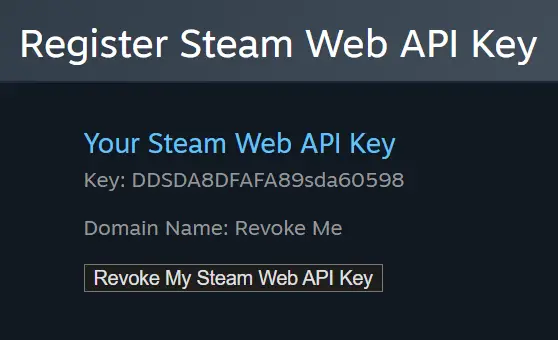
Again, there should be no key by default — it is not needed to send trades or do normal things. If a key exists and you did not create it, revoke it right away (next section) and change your password.
How to remove, revoke or change your Steam API key
You can remove or change the key on the same dev/apikey page: click "Revoke My Steam Web API Key". You do not need to generate a new key afterward — a regular account does not require one.
If you entered your details on a suspicious site or approved a QR login, revoking the key alone is not enough — assume the whole session may have leaked. In that case, in order:
Revoke (remove) the API key on the developer page.
Change your Steam password and the password of your linked email.
Sign out of all devices and check Steam Guard.
Change your trade link (Trade URL).
What the Steam API scam is and how it works
The Steam API scam is a scheme where attackers gain access not to a single API key but to your Steam session or account, and then create a Steam Web API key to swap your trades.
After a compromise, a key you never created may appear on the dev/apikey page — Steam sends no notification about it. Then nothing happens for a while. But when you decide to trade your items (which may be days or months later), the attackers track the trade you create, cancel the original offer and make a new one to their imitator bot. Your trade history then shows two offers with the same items: one to the real recipient and one to the scam bot, whose name and avatar may be faked to look like the real recipient. The moment you confirm the trade, your skins go to the attackers. Steam describes this as trade redirection.
How attackers steal your session
Sessions are most often stolen by phishing sites — clones of markets and services, fake Steam windows, a fake QR login, malicious browser extensions, and hijacked friend accounts that send links in someone you know’s name. The hook looks harmless: "vote for my Workshop item", "sign up for a tournament", "skin check", "account verification", "safe trade".
The key difference shows at the moment you log in through Steam. A real site redirects you to the official Steam domain (Steam OpenID): if you are already logged into Steam in that browser, you usually just click "Sign In", with no need to re-enter your login and password or scan a QR code.

A scam site shows a fake login window, asks you to enter your details right on its page, or offers a QR code that confirms the login for the attacker, not for you. The Steam QR login is only safe on the official Steam domain.
What changed after Trade Protection
For CS2 items Steam added Trade Protection. After a trade, such items are protected for 7 days: you can use them in-game, but you cannot pass them on, modify or consume them. If your account was compromised and items left through a scam trade, you can reverse the deal with protected items within that window from your trade history.
Important: Trade Protection is a last resort, not a replacement for caution. Reversing a protected deal returns the items to both parties, but the account gets a 30-day restriction on trading and the Steam Community Market. Better not to reach a reversal at all — check the trade before you confirm it in the mobile authenticator.
How to protect yourself from the Steam API scam
If, while trading on LIS-SKINS, you see a warning that the trade was canceled by Steam, do not confirm the trade and follow the steps to secure your account. That is exactly what a swap attempt looks like.

The basics that cover most Steam API scam scenarios:
Check the domain in the address bar before signing in through Steam: a real authorization happens only on the official Steam domain, not in an embedded window on a third-party site.
Do not enter your details or scan a QR code on suspicious pages; be careful with links from strangers and even from friends — their account may be hacked.
Do not install dubious extensions for "auto-confirms", price checks or market tweaks.
Regularly check for an API key and your trade history; before confirming, verify the recipient’s name, level, avatar and registration date.
Remember: Steam Support never adds you as a friend and never asks you to send skins to a "safe account" — any such request is a scam.
Sell and trade skins only on trusted platforms.
For more, see our guides on how to trade skins in CS2 and how to cash out CS2 skins after the Trade Protection update. And you can buy and sell skins safely on the LIS-SKINS market.
Frequently Asked Questions
Does a regular player need a Steam API key?
No. You do not need an API key to buy, sell or trade skins — by default your account has none. If a key appeared that you did not create, that is a reason to check your account security.
Is the API key dangerous by itself?
The key alone is not. The danger is a stolen session: that is what turns the key into a trade-swapping tool. So the point is not to "hide" the key but to keep attackers out of your account.
How can I tell a trade was swapped?
Your trade history shows two offers with the same items, one of them canceled. Before confirming, verify the recipient’s name, level, avatar and registration date — an imitator bot usually differs.
Can I get skins back after a swap?
For CS2 items, yes, if you act within the 7-day Trade Protection window and reverse the deal from your trade history (followed by a 30-day account restriction). Items without protection usually cannot be recovered.
