


A Steam API scam is a scheme in which attackers phish your Steam session, create a Steam API key on your account and use it to swap your trade offers, so your skins go to a lookalike bot instead of the real recipient. You can check whether your account has an API key on the official Steam Web API Key page; by default there is none. If a key appeared without your knowledge, revoke it, change your password and sign out of all Steam sessions.
An API key is a credential for accessing the Steam Web API. On its own it isn't a password for your account, but combined with a stolen Steam session it can be used to monitor trade offers and swap them out mid-exchange. Scammers exploit this to redirect trades, meaning your items can be stolen in the middle of a legitimate trade with a friend or even a trusted skin marketplace. Below we cover how access gets stolen, how trade swapping works, what Trade Protection changed and how to secure your account.
How Scammers Steal Your Data in a Steam API Scam
The most common method is phishing sites that capture your credentials when you log in using Steam. These can be lookalike copies of legitimate platforms or marketplaces, or other sites posing as useful tools or player analytics services.
The tactics have evolved significantly: attackers now go beyond fake login forms and use fake QR login prompts, malicious browser extensions, spoofed Steam windows, and compromised accounts belonging to friends that send out links under a familiar name. The threat doesn't always look like an obviously sketchy website; it often starts with a completely ordinary message in Steam, Discord, or another chat.
You might stumble across these sites through a search engine (which is exactly why we strongly advise against clicking paid ad results at the top of the page, and recommend bookmarking our site directly to avoid landing on a fake). But these schemes often involve real Steam users who reach out and ask you to follow their link and do something on the site:
sign up to participate in a tournament for your favorite game;
vote for "their" item on the Workshop, and so on.
Common lures also include links to "skin inspection," "account verification," "false report appeals," "team voting," or "secure trades." Even if such a message comes from someone you know, always verify their account hasn't been compromised before clicking anything.
How to Spot a Fake Steam Login
Staying safe from Steam API fraud requires staying alert. When you land on a scam site, you'll usually have no idea anything is wrong: it may look identical to the real thing (if it's a clone) or simply look trustworthy (in other schemes).
So you'll browse around without suspicion, and at some point the site will ask you to log in through Steam to use a particular feature. This is where the difference between a legitimate site and a fraudulent one becomes clear.
If you're already logged into Steam in your browser:
A legitimate site: Redirects you to Steam's official domain to log in via Steam OpenID. If you're already signed into Steam in that browser, you'll typically just need to confirm with a "Sign In" button, with no need to re-enter your credentials or scan a QR code.

A fraudulent site: Displays a fake login window and asks you to enter your credentials directly on the page, or prompts you to scan a QR code that actually authenticates the attacker's session, not yours. Steam's QR login is only safe on Steam's official domain; on a phishing site, it becomes a tool for stealing your session.
If you enter your credentials or confirm a QR login on a phishing page, attackers can gain full access to your Steam session.
What Is an API Key, API Token, and Trade URL?
Discussions around the Steam API scam frequently involve the terms "API key," "API token," "token," or just "key," and it's worth understanding the distinctions. A Steam Web API key is a credential created on the official Steam Web API Key page. Session tokens and cookies are the authentication data your browser stores once you've logged in. If scammers steal your session through phishing, a fake QR code, or a malicious browser extension, they can act on behalf of your account even without knowing your new password, until you terminate the session.
A trade URL is a separate matter. On its own it doesn't give scammers access to your account or allow them to steal items without confirmation, but if your account has already been compromised, you should regenerate your trade URL at the same time as changing your password and revoking your API key.
How Does a Steam API Scam Work?
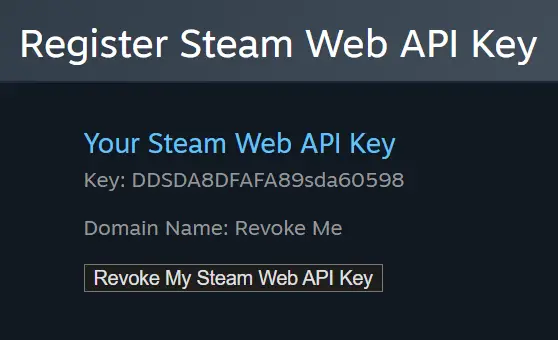
After your account or session has been compromised, a Steam API key may be created without your knowledge at the official Steam Web API Key page (steamcommunity.com/dev/apikey), and you may not notice, since the Steam client shows no obvious warning about it.
And then nothing happens. At least for a while, in the typical Steam API Scam scenario. You carry on as normal, play your games, go about your day. It's only when you decide to trade your items, which could be days or even months later, that the scammers make their move and intercept the exchange.
When you send items to a friend, a marketplace, or another one of your own accounts, scammers can detect the outgoing trade, cancel the original offer, and create a new one directed at their impersonator bot instead. If you check your trade history at that point, you'll see two offers with identical items: one for the intended recipient, one for the fraudulent bot. More sophisticated attackers will also dress up their bot to look like the intended recipient, copying the avatar and account details. As soon as you confirm the trade, your skins go to the scammers rather than where you intended.
Steam describes this type of attack as trade substitution or redirection: the user believes they're confirming a trade with a trusted account, but is actually sending items to an impersonator.
What Changed After Trade Protection Was Introduced?
For CS2 items, Steam introduced a Trade Protection mechanism. After a trade, CS2 items are protected for 7 days: they can be used in-game, but cannot be traded further, modified, or consumed. If your account was compromised and items were sent through a fraudulent trade, you may be able to cancel transactions involving protected items within that window through your trade history.
Important: Trade Protection is a last resort, not a substitute for being careful. When you cancel protected trades, Steam returns the items to the parties involved, but the reversal itself may bring temporary trading restrictions on your account. It's far better to catch the problem before confirming in the mobile authenticator than to rely on reversal after the fact.
How to Check the Steam API Key on Your Account
The first thing to do is check whether an API key has been generated on your account. You can do this on the official Steam Web API Key page: steamcommunity.com/dev/apikey. By default, accounts don't have an API key, since you don't need one for sending trades or other standard account activity.

If a key exists and you didn't create it, revoke it immediately and change your password to prevent trade manipulation.
However, revoking the API key alone is no longer enough. If you entered your credentials on a suspicious site or confirmed a QR login, you should assume your entire Steam session may have been stolen. In that case: revoke the API key, change your Steam password, change your email password, sign out of all devices, review your Steam Guard settings, and only then regenerate your trade URL.
To fully regain control of your Steam account, we also recommend regenerating your trade URL. You can do that in your Steam trade settings.
When you sell items to our bot, we'll also alert you if our trade offer to you gets canceled. We can't guarantee that scammers haven't previously accessed your API key, your session, or some other means of intercepting your trades, but we do everything we can to help you spot a fake trade offer.
If your trade gets canceled by Steam, you'll see a warning banner on our site (see the screenshot below) and hear an audio alert.

Never rush to confirm a trade in your mobile authenticator. Always check the details of the bot you're sending items to first (name, level, avatar, account creation date). If scammers are attempting to swap the trade, these details may not match.
Check your recent trade history at steamcommunity.com/my/tradeoffers/. If you see two identical offers at the top of the list, one of them canceled, that's a sign the trade was hijacked. Confirming the remaining offer will send your items to the scammers, not to us.
We also recommend completing transactions in a desktop browser, where you can have the site and your mobile authenticator open side by side, making it much easier to verify the trade before confirming.
If you've already confirmed a suspicious trade involving CS2 items, check your trade history and Trade Protection status immediately. If the trade is still within the 7-day protection window, you may be able to cancel it through Steam's trade tools. But securing your account comes first: change your password, revoke the API key, terminate active sessions, and scan your computer for malware.
How to Stay Safe from API Key Scams
Here are some additional steps that will help keep your Steam account secure and make it safer to trade skins. Broader advice on other schemes is in our guide on protecting your inventory from scammers.
Always verify any site that asks you to log in through Steam. Phishing domains often differ from the real thing by just one or two characters in the URL.
Before signing in via Steam, check the domain in the address bar, not just what the page looks like. A legitimate Steam login must go through Steam's official domain, not through an embedded window on a third-party site.
Be cautious with people you don't know personally. Treat any links they send with skepticism and research the site before clicking through or taking any action on it.
Steam has added warnings for suspicious messages in direct chats and lets you report them directly from the conversation window. But the absence of a warning doesn't mean a link is safe: no filter catches every phishing scheme.
Stay alert to suspicious offers, like invitations to tournaments or trades from people you don't know.
Be highly skeptical if anyone messages you claiming to be Steam Support and asks you to send your items to a friend or a different account. A common pretext is that this is "required" to secure your items during an account "verification" because your profile allegedly contains stolen goods. Real Steam Support staff will never add you as a friend or message you in chat. If you see a notification in your profile saying it's under review and then receive a message from "Support," your account has already been compromised.
Steam Support will never ask you to transfer items to a "secure account," will never conduct verification through private messages, and will never ask you to send skins to a friend, bot, or alternate profile. Any such request is a scam.
Don't install sketchy browser extensions for trade management, "auto-confirmation," price checking, or marketplace features. Malicious extensions can modify pages, read browser data, and help attackers access your active session.
Regularly check whether an API key exists on your account and keep an eye out for any suspicious activity.
After any suspicious login, don't stop at checking the API key. Review your email, Steam Guard settings, active devices, trade history, and trade URL. If anything seems off, change your password and sign out of all devices.
Whenever you send items to someone, double-check who you're actually sending the trade to.
Only use trusted, established third-party sites for selling or trading skins. On LIS-SKINS, for example, you can sell skins instantly without hunting for buyers in chats.
And most importantly, don't treat Trade Protection as your primary line of defense. It can help after a fraudulent trade involving CS2 items, but the safer approach is catching the substitution before you confirm the trade in your mobile authenticator.
FAQ
Where do I find my Steam API key?
On the official Steam Web API Key page (steamcommunity.com/dev/apikey) while signed in. If it shows a key you never created, click "Revoke My Steam Web API Key," then change your password and sign out of all devices.
Do I need a Steam API key to trade or sell skins?
No. Regular trades, the Steam Community Market and selling skins on marketplaces all work without one, which is why most players have no key at all. A site that asks you to create or paste a key is a red flag.
What should I do if my skins were stolen through a swapped trade?
Secure the account first: revoke the API key, change your Steam and email passwords and end all sessions. Then open your trade history: if a trade with CS2 items is still inside the 7-day Trade Protection window, you may be able to reverse it. For safe ways to cash out, see our guide on how to sell CS2 skins.
Is it dangerous to share my trade URL?
A trade URL alone gives no access to your account and cannot pull items without your confirmation. The real risks are phishing logins, fake QR codes and malicious extensions that steal your session.
