


There are three ways to sell CS2 skins: on the Steam Community Market, on a third-party marketplace such as LIS-SKINS, or directly to another player through a trade. The Steam Market keeps about 15% and pays into your Steam Wallet, which cannot be withdrawn. A marketplace buys your items and pays out to a bank card or in crypto. A direct trade has no fee but carries the most risk. Below are the pros and cons of each method and a step-by-step walkthrough of selling on a site.
The method you choose decides how much you actually receive, how fast the money arrives and whether you can spend it outside Steam. One option suits players who want to refresh their inventory, another suits those who want to turn skins into real money.

Official Marketplace
The first thing that comes to mind for most players who want to sell CS2 skins is the Steam Community Market. You list an item straight from your inventory, buyers come from the entire Steam user base, and no third-party sites are involved.

It is considered the easiest option, but it has clear drawbacks:
Valve keeps about 15% of every sale: a 5% Steam fee plus a 10% CS2 fee;
proceeds go to your Steam Wallet and can only be spent inside Steam on games and items; you cannot withdraw them to a card;
an expensive skin can take a long time to sell, and you have to adjust the price manually as the market moves;
items you received in a trade are locked for 7 days under Trade Protection and cannot be listed.
Selling also requires Steam Guard Mobile Authenticator; without it the account keeps the old 15-day hold. So the Steam Market works if you plan to spend the money on Steam, and does not work if you want to sell skins quickly and withdraw cash.
Selling Skins on a Website
Not surprisingly, plenty of sites now offer to buy skins for real money. They follow one of two models. Some buy items from players directly at a price you see up front: pick your skins, get the amount. Others work as marketplaces where the seller sets the price and waits for a buyer. Either way, the payout goes to a card or crypto rather than to a Steam Wallet.
Selling requires signing in with your Steam account, so the service can see your inventory and send a trade offer for the items you chose. If the site turns out to be a scam, you risk losing items, and many of them are worth a lot. Before you sell, check the platform:
check the address: scammers build copies of well-known sites with look-alike domains, so it is safer to type the URL yourself;
sign in only through the official Steam window and never share your password, Steam Guard codes or API key;
read reviews on independent platforms and in community forums;
study the terms: the fee, payout methods, payout timing and limits.
Following these rules lets you sell skins at a good price without putting your account at risk. Our guide on protecting your inventory from scammers covers the most common schemes.
Trading Directly With Another Player
The third option is to find a buyer yourself, for example in a community or among friends, and send the skin through a trade offer to their trade link. There is no fee, and you negotiate the price directly. In return you take on all the risk: a payment made outside Steam has no protection, and the buyer can disappear once they have the item.
Since July 2025 Trade Protection has made this harder: the sender can reverse any CS2 trade within 7 days, and received items are locked for that period. Our article on Steam Trade Protection explains the mechanic in detail. As a result, selling for money outside a platform is risky for both sides, and it only makes sense with people you trust.
How Much Do Skins Cost?
The same item can be priced differently on different platforms. The main factors behind what you can get for your CS2 skins are rarity, wear, demand and how many copies are on sale. A Field-Tested AWP | Dragon Lore, for example, currently costs around $6,600, while most Consumer and Mil-Spec skins are worth cents. You can check the approximate value of a specific skin on the Steam Market or in the LIS-SKINS catalog.

One of the knife skin collections
Prices move with the popularity of items, how often they drop, game updates, tournaments and other events. Most of the value in an inventory usually sits in knives, gloves, popular AK-47, AWP and M4 skins, rare stickers and cases, so those are the items most worth selling. Once you know how to sell CS2 skins, there is always a way to do it at a good price.
Selling Methods Compared
| Method | Where the money goes | Fee | Main risk |
|---|---|---|---|
| Steam Community Market | Steam Wallet, no withdrawal | About 15% | Money cannot be withdrawn, long wait for a buyer |
| Marketplace (LIS-SKINS) | Card, crypto or site balance | Service fee, shown before the sale | Fake copycat sites, check the URL |
| Direct trade | Whatever you agree on | None | Scams and trade reversal within 7 days |
Advantages of Selling Through a Website
If you started playing recently, the official market may seem simpler and more convenient. Specialized sites, however, have a number of advantages:
no need to wait for a buyer for a specific skin;
you can sell many items at once;
the payout amount is shown before you confirm the deal;
money goes to a card or crypto instead of staying in your Steam Wallet.
You do not have to spend time listing items, picking a price and handling other routine steps. Our article on how to convert skins into real money covers the payout side in more detail.
How to Sell Skins on LIS-SKINS
The process is similar on most sites. On LIS-SKINS it looks like this:
Sign in with your Steam account.
Add your trade link so the service can send you a trade offer.
Open your inventory and select the items you want to sell: the total and the service fee appear right away.
Choose a payout method (bank card, crypto or your LIS-SKINS balance) and enter your payment details.
Check the items in the trade offer and confirm the transfer in the Steam mobile app, just as you would in a trade with another player.
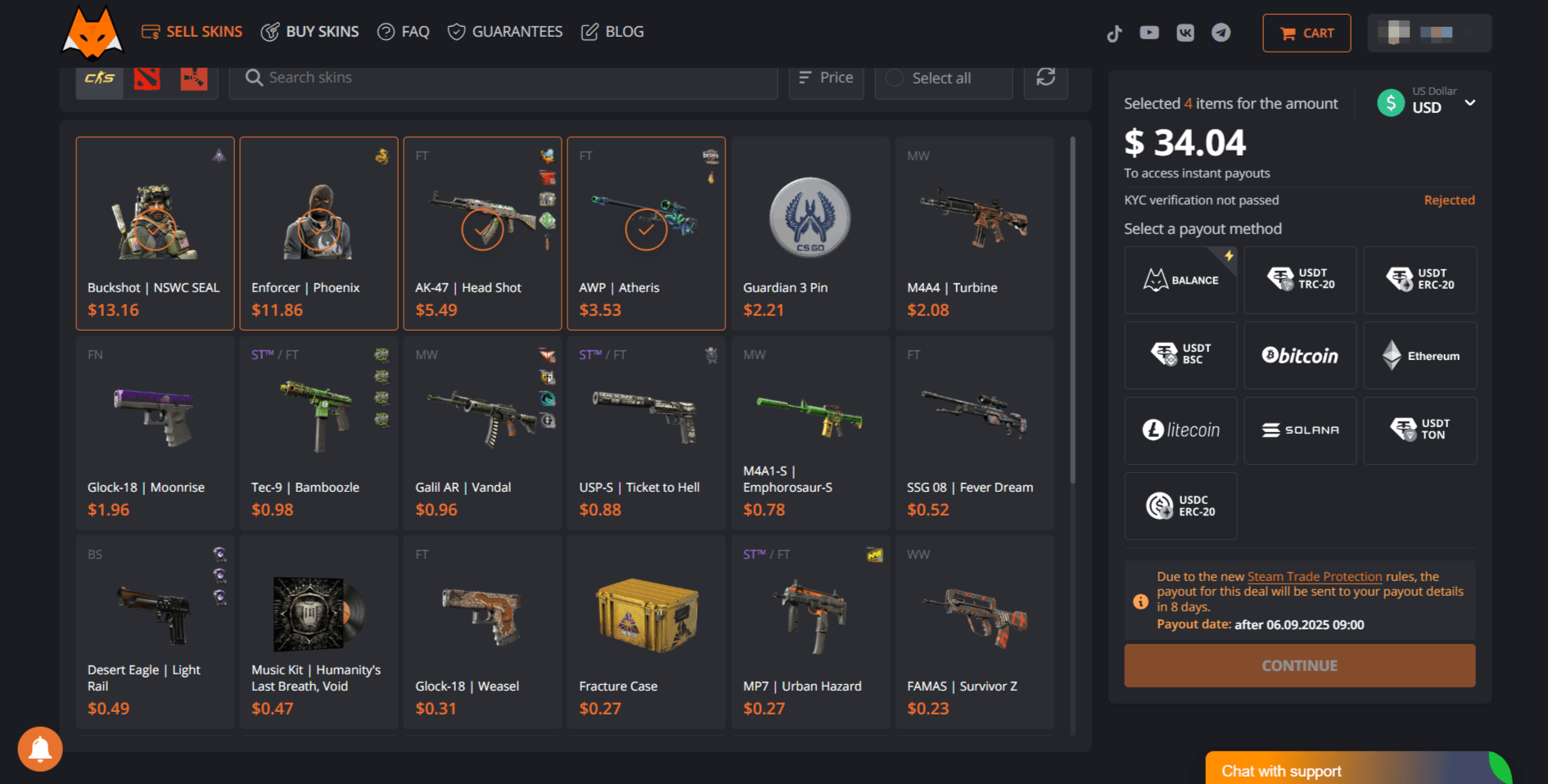
Because of Trade Protection, a standard payout for sold skins arrives after 7 days, once the protection period is guaranteed to be over. If you need the money right away and meet the conditions, instant withdrawal without the Trade Protection delay is available. If your goal is to refresh your inventory rather than cash out, choose the site balance and spend it on the skin you want straight away.
Playing CS2 is not only about enjoying matches; over time you can also build an inventory that is worth real money. Even if your drops are not especially rare, knowing how to sell CS2 skins comes in handy. If you plan to trade regularly, see our tips on how to make money selling CS2 skins.
FAQ
Where is the best place to sell CS2 skins?
If you want real money, a marketplace is the better choice: Steam keeps about 15%, and Steam Wallet funds cannot be withdrawn. If you plan to spend the money on Steam, the Steam Market works too.
Can you sell skins right after a trade?
No. Items received in a trade stay under Trade Protection for 7 days, and you cannot list them on the Steam Market or sell them on a site until it ends.
How long does it take to get paid for sold skins?
On LIS-SKINS a standard payout arrives after 7 days because of Trade Protection. If you meet the conditions, instant withdrawal takes a few minutes.
Is it safe to sell skins on websites?
Yes, if the platform is trustworthy: sign-in goes through the official Steam window, the address is correct, and you never share your password, Steam Guard codes or API key.
