


AVG on FACEIT (short for "average") is your per-match average across kills, deaths, assists, MVPs, damage per round and K/D. The quickest way to check your AVG in CS2 is on the FACEIT website: open your profile, go to the Stats tab and select Counter-Strike 2. For deeper numbers you can use third-party stat sites such as FACEIT Tracker, FACEIT Stats and FACEIT Analyser, or the Repeek browser extension, which adds stats directly to the FACEIT interface.
Below you will find what each average means, how to find it with all three methods, and which values count as good. If you are new to the platform, start with our guides on how to register on FACEIT and how to play on FACEIT in CS2.
What AVG Means in FACEIT Stats
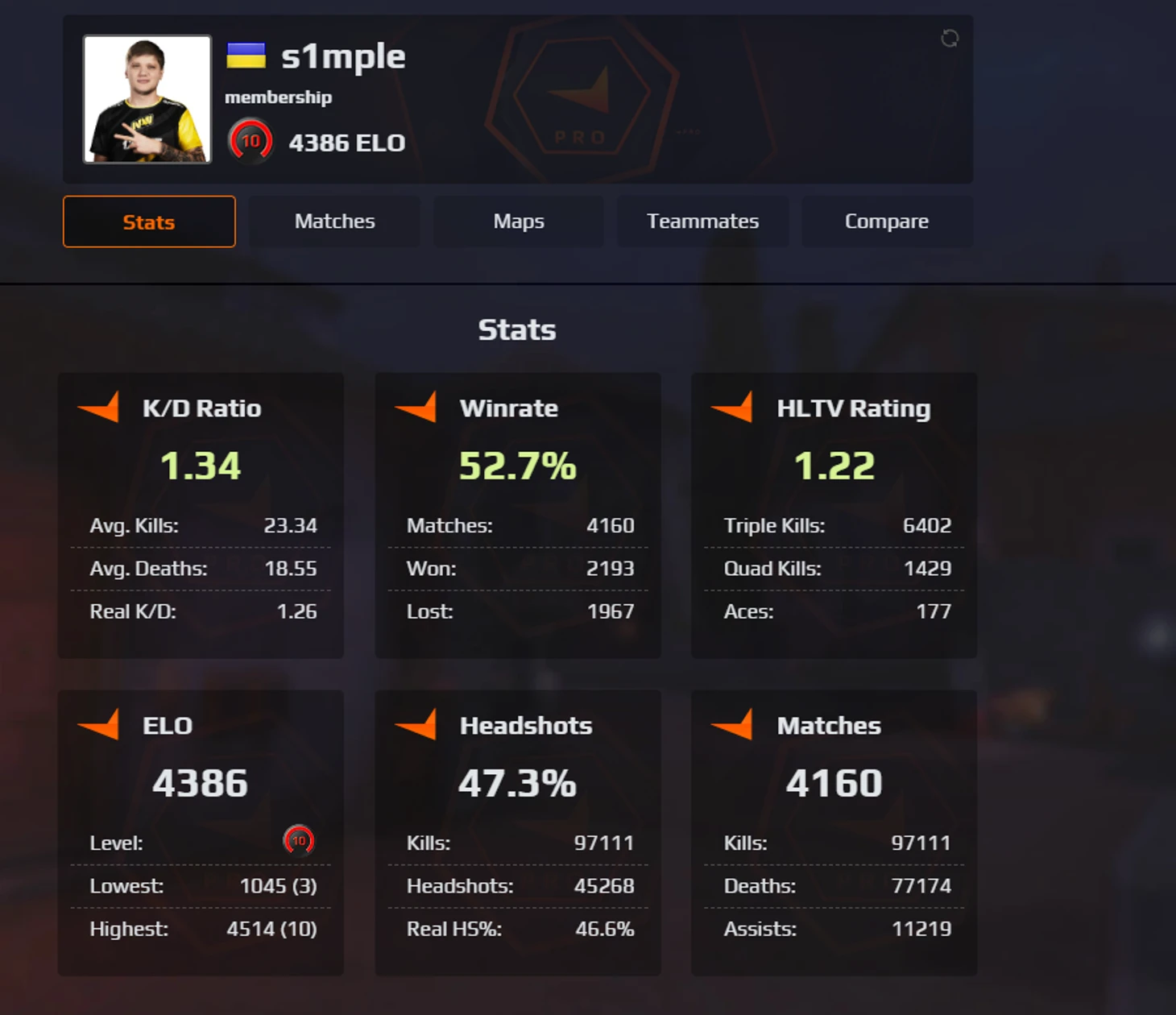
AVG stands for average. In FACEIT statistics it is a set of numbers that describe how effective a player is per match or per round on average. One great game says little; averages over dozens of matches show your real level and help you climb the FACEIT levels.
The core averages cover a few key metrics. Avg. Kills is the average number of kills per match and shows how well you win duels. Avg. Deaths is the average number of deaths, which says a lot about positioning and how carefully you play. Avg. Damage is the average damage per round or match, one of the most objective measures of what you contribute to the team.
FACEIT also tracks Avg. Assists, which reflects team play, and Avg. MVPs, the average number of round MVP awards. Taken together, these numbers describe your play style and point to what needs work first.
How to Check AVG in Your FACEIT Profile
The FACEIT website has the most complete and up-to-date stats, refreshed right after each match ends. Checking them takes about a minute and needs no extra software: everything is in your profile once you log in. Follow these steps:
Log in at faceit.com with your FACEIT credentials or through Steam.
Open your profile by clicking your avatar in the top-right corner.
Select the "Stats" tab in the profile menu.
Choose Counter-Strike 2 from the list of games on your account.
For extended analytics, open FACEIT Track, the personal stats tracker. Tab names in the FACEIT interface change from time to time, but your CS2 stats always live in your player profile.
That is all it takes to reach your full statistics. The analytics page loads your latest data automatically and updates it after every completed match.
The overview comes with filters. You can narrow the stats down by match type (regular matchmaking, tournaments, leagues), by time range (last week, last month, all time) and by map. This lets you check your AVG on FACEIT in CS2 under exactly the conditions you care about, for example only on your best maps or only in tournament games.
The extended stats section shows every key average. You also get ELO history charts (see how to check your ELO on FACEIT), clutch stats for 1v1, 1v2 and 1v3+ situations, and a breakdown for each map in the active pool. The main averages in your profile are:
Avg. Kills: average kills per match.
Avg. Deaths: average deaths per match.
Avg. Assists: average assists per match.
Avg. MVPs: average round MVP awards per match.
Avg. Damage: average damage per round.
Avg. K/D Ratio: average kills per death.
Win Rate: the share of matches you won.
All of this updates automatically, so you can follow how your skills develop. Your stats stay in the profile, which means you can compare any two periods.
Third-Party Services with FACEIT AVG Stats

Besides the official site, several third-party services pull data through the FACEIT API and present it in their own way. They often add analytics the main site does not have. Data there can lag slightly behind FACEIT, and each service offers its own set of metrics.
FACEIT Tracker
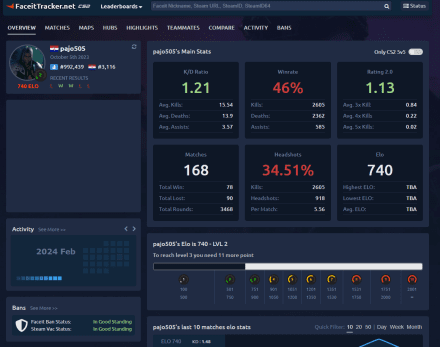
FACEIT Tracker (faceittracker.net) is one of the most detailed stat services. To check AVG on FACEIT in CS2 there, enter a Steam URL or Steam ID in the search bar: the site finds the linked FACEIT profile automatically. No sign-up is needed, and it is free.
The profile page goes well beyond basic Average Kills, Deaths and Assists. It also shows the average number of triple, quadruple and five-kill rounds per match, and Average Damage is listed separately, so you can judge your real impact. The 1v1 and 1v2 Win Rate numbers are especially useful: they show how often you win clutches, which reflects composure and decision-making when your team is down a player.
FACEIT Tracker also offers a filterable match history, comparisons with teammates and monthly ELO progress charts. Data refreshes within minutes after a FACEIT match ends.
Other Useful Services
FACEIT Stats (faceitstats.com and faceit-stats.me) are alternatives with similar features. They show ELO, current level, full match history, headshot percentage and HLTV rating. You search by FACEIT nickname, which helps when you do not know a player's Steam ID.
FACEIT Analyser (faceitanalyser.com) focuses on in-depth analysis. It highlights a player's best maps and hubs and reviews match history for strengths and weaknesses. It is a good fit if you want your FACEIT AVG broken down by map to see where your game needs work.
FACEIT Finder (faceitfinder.com) does one simple job: it finds a FACEIT account from a Steam profile and shows the basics, ELO, level and a link to the full profile. That is handy for a quick look at a teammate or an opponent during a session.
Third-party services at a glance:
| Service | Main features | Search by | Strengths |
|---|---|---|---|
| FACEIT Tracker | Detailed averages, match history, teammate comparison | Steam URL/ID | Most detailed stats, progress charts |
| FACEIT Stats | ELO, level, history, HS%, HLTV rating | FACEIT nickname | Simple interface, fast loading |
| FACEIT Analyser | Best maps and hubs, in-depth analysis | FACEIT nickname | Focus on strengths and weaknesses |
| FACEIT Finder | Basics: ELO, level | Steam profile | Quick lookup, minimal design |
The Repeek Extension: AVG Right on FACEIT
If you play on FACEIT a lot, the Repeek browser extension (formerly FACEIT Enhancer) is a convenient option. It is an unofficial third-party extension that adds features to the FACEIT site, including the ability to check AVG on FACEIT in CS2 without leaving the page.
Repeek does more than show stats; it also automates routine actions, and every feature can be switched on or off. Its main features:
Automatic acceptance of matches and party invites.
The average ELO of both teams in the match room.
The potential ELO change before the game starts.
ELO won or lost added to your match history.
Installation takes about a minute and works the same way in every supported browser:
For Google Chrome, Opera, Microsoft Edge and Yandex Browser, open the Chrome Web Store and search for Repeek (formerly FACEIT Enhancer).
For Firefox, open Mozilla Add-ons and search for Repeek.
Click "Install" and confirm adding the extension to your browser.
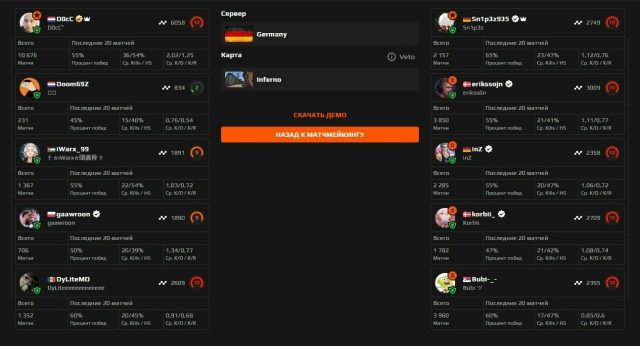
Once installed, Repeek runs on every FACEIT page. The extension settings (its icon in the browser toolbar) let you toggle individual features. Two of the most useful ones are the progress bar toward your next FACEIT level and detailed stats for other players right in the match lobby, so you can check the AVG of your teammates and opponents before the game begins.
Other Stats Worth Checking Besides AVG
Averages are only part of the picture. FACEIT and stat sites offer extended metrics that reveal the details of your play style and point to specific areas to improve.
RWS (Round Win Shares) rates your contribution to round wins. It counts not only kills but also objective plays such as planting or defusing the bomb, and tries to filter out low-impact frags. As a rough guide, strong players tend to sit around 9-10 RWS, while most players are lower, around 6-8.
ADR (Average Damage per Round) is one of the most objective performance metrics. A player with a high ADR but an average kill count is often playing a support role and trading well. An ADR of 70-80 is usually considered good at a mid level; pros are often above 80.
K/D Ratio (kills per death) remains the classic metric: anything above 1.0 means you give your team more than you cost it. Headshot % shows shooting accuracy; many pros are at around 50% or higher. Utility Damage shows how well you use grenades, which matters more the higher you climb.
Entry Frags (first kills of a round) show how aggressive you are and how often you open up sites. Clutch stats (1v1, 1v2, 1v3+) reflect composure and decision-making under pressure. Most of these metrics are available in FACEIT's extended stats or on third-party services; they complement your AVG and show your game from different angles.
Key stats explained:
| Stat | Meaning | What it shows | Good level |
|---|---|---|---|
| Avg. Kills | Average kills per match | Fragging power | 15-20+ |
| Avg. Deaths | Average deaths per match | Caution, positioning | 12-15 |
| Avg. Damage | Average damage per round | Real contribution | 70-80+ |
| K/D Ratio | Kills / deaths | Overall efficiency | 1.0+ |
| HS % | Headshot percentage | Aim accuracy | 40-50%+ |
| RWS | Share of round wins | Impact in key moments | 8-10+ |
| ADR | Average damage per round | Damage consistency | 70-80+ |
| Entry Frags | First kills | Aggression, opening sites | Depends on role |
Why Track Your Averages on FACEIT
Regular stat reviews are what separate players who want to improve from those who just play. Checking your AVG on FACEIT in CS2 gives you an objective view of your progress, which gut feeling alone cannot provide.
Averages expose strengths and weaknesses. If your damage is low while your kill count is normal, work on utility and trading. A low headshot percentage calls for aim practice, for example on aim maps. Weak numbers on specific maps mean it is time to study positions and timings there; the current pool is covered in FACEIT maps in CS2. Reviewing your own games helps too, and there is a separate guide on how to watch FACEIT demos.
Comparing your numbers with players at a similar level shows where you stand relative to the average at your rank. That helps you set realistic goals and measure progress. Pro teams use the same kind of analytics to prepare for tournaments, find weak links in the opposing lineup and adjust their own tactics.
Looking at your AVG over different time periods also tells you whether your practice works. If your headshot percentage rose by 5% after a week of aim training, the training pays off. If your numbers stall or drop, it is time to change the approach.
Final Recommendations
There are three main ways to check your AVG on FACEIT in CS2: the official profile on the FACEIT website (including FACEIT Track), third-party services such as FACEIT Tracker or FACEIT Stats, and the Repeek browser extension. Each has its strengths: the official site has the most detail, third-party services are quick to open, and Repeek puts everything you need inside the FACEIT interface.
A combination works best: official stats for in-depth analysis, FACEIT Tracker for comparisons with other players and Repeek for quick checks during a session. Reviewing your averages regularly is one of the most reliable ways to improve and move up the FACEIT levels, because you can only fix what you can measure.
FAQ
What does AVG mean on FACEIT?
AVG (average) is your per-match average for kills, deaths, assists, MVPs, damage and K/D. It shows how consistently you play over many matches, not just how a single game went.
Where can I see my AVG on FACEIT?
In your profile on faceit.com: open the Stats tab and select Counter-Strike 2. FACEIT Tracker, FACEIT Stats and FACEIT Analyser add more detail, and the Repeek extension shows stats right on FACEIT pages.
Can I check another player's AVG?
Yes. Open their FACEIT profile by nickname, or find the account from a Steam link with FACEIT Tracker or FACEIT Finder. With Repeek, teammates' and opponents' stats are visible in the match room.
What is a good AVG on FACEIT?
There is no single standard, since level and role matter a lot. The table above gives practical benchmarks: K/D of 1.0 or more, ADR of 70-80 or more and a headshot rate around 40-50%.
