


The easiest way to get training maps in CS2 is the Steam Workshop: subscribe to a map and it shows up in the game under Workshop Maps. The most useful ones are Aim Botz for shooting at bots, Yprac Bot Arena with modes from spraying to one-tap headshots, DC Aim & Movement Training for shooting on the move, and Recoil Master for spray control. Below we cover how to install these maps (through the Workshop or manually) and what each of them trains.
Training maps exist to drill what a regular match never gives you enough repetitions of. Your Premier rating or Competitive rank climbs slowly, while a training map lets you spend hours on individual skills:
map knowledge and positions;
engine quirks and movement;
weapon behavior;
no-scope AWP shots and iron-sight aiming;
well-timed prefires;
recoil and more.
That is what CS2 Workshop training maps are for. We also have separate guides to the best aim maps in CS2, prefire training maps and maps for grenade practice.
How to install training maps
A training map is not in the list of official maps: you have to download it or subscribe to it first. There are two ways to do this:
manually;
through the Workshop.
Here is how each one works.
Manual install
The manual route is straightforward:
download the aim training map you need, preferably from a trusted source and in its CS2 version;
put the file in Drive_Name\SteamLibrary\steamapps\common\Counter-Strike Global Offensive\game\csgo\maps;
launch the game and open the console with the ~ key (if it does not open, turn it on in Settings, Game, Enable Developer Console);
type map followed by the map name exactly as the file is named.
For Aim Botz, for example, the command is:
map aim_botz

CS2 maps come as VPK files. Old CS:GO maps in BSP format do not load in CS2, so look for a version updated for the new game.
If everything is right, pressing Enter loads one of the best aim training maps in CS2.

Workshop
This option is simpler and more convenient. Nothing needs to be copied into the game folder: you pick Workshop maps for aim training, subscribe, and Steam downloads and updates the files for you.
In Steam, go to Community, Workshop, Counter-Strike 2, Browse, Maps. We also have a short guide on where to find the Workshop in CS2.

Next, find the map you want (we used Aim AWP Training as an example) and click Subscribe.
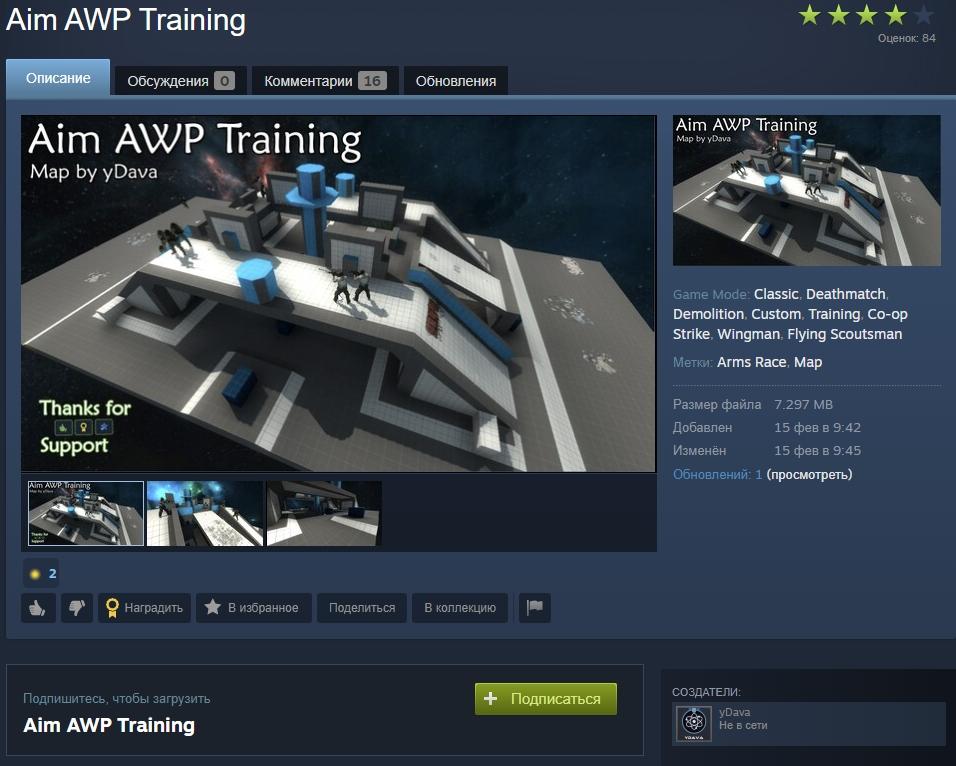
Then launch the game and open the Workshop Maps section, where all your subscriptions are listed.

Pick a map, set the bot difficulty and the number of bots, and start training.

In practice, the Workshop is the better way to build a collection of training maps in CS2. Subscriptions are tied to your account, and maps update automatically whenever the author changes them.
Best CS2 Workshop training maps
Now to the maps themselves. Where is the best place to warm up, test new weapons, tactics and grenade lineups? On Workshop maps built for aim and skill training. Before subscribing, check that the map has been updated for CS2: popular maps usually have a separate version for the new game.
Aim Botz

The best-known and most popular training map for beginners and experienced players alike. It is a fully custom project with a long list of settings. Here you can:
control the number and movement of bots;
turn armor on or off;
turn blood on or off if it clutters the walls and floor;
practice with any weapon available in the game;
train accuracy with limited ammo or shoot without limits.
There are so many options that choosing a setup can take a good few minutes. Some players set themselves challenges and run them against the clock.
The map has long been popular with pros too: Aim Botz is a common pre-match warm-up.
Yprac Bot Arena

An equally popular map for AWP and aim training, and a versatile tool for both beginners and strong players. It has several modes:
Bodyspray: full-auto fire with the left mouse button held down;
Aim Botz: surrounded by bots to practice aimed shots;
Precision: accuracy;
One Taps: accuracy too, but one bullet to the head;
Burst Fire: short and long bursts;
Alternating: bots appear in different spots and you have to switch targets quickly.
The map also has a warm-up mode, grenade practice, site entries for planting and defusing the bomb, a cover system and a range of game situations worth replaying regularly.
DC Aim & Movement Training

This map trains two skills at once: shooting accurately on the move and making quick decisions. Picking off bots from one spot is one thing; tracking targets that move fast across the arena and shoot back is another.
Reading a situation in a split second decides many rounds. Every challenge on this map is timed. The main tasks:
accurate shooting with any weapon;
strafe training;
shooting with the left and right hand;
handling every weapon type;
reaction time and hitting the edge of an enemy model.
The map has enough features to keep training from getting boring. The one limitation: it is a single-player map, so there is no multiplayer on it.
Recoil Master Spray Training

Recoil needs its own practice. If you do not control the barrel, you lose precious time, and an opponent often needs only a split second to win the duel. How spray works in the new game is covered in our guide on how to control recoil in CS2. On this map you will work on:
pulling the mouse against the recoil;
barrel direction;
the spray path;
holding and controlling a long burst.
There are plenty of settings here too: target type and size, distance, weapon type and more. In the middle of the field there is a point you need to hit as many times as possible while holding the trigger. The more accurate shots, the higher the score. After each session the screen shows your stats.
There are many more maps like these, and new ones appear regularly. Open the Workshop, read the descriptions, ratings and reviews: there are good maps for every play style.
