


You can gift a skin in Dota 2 right from the game: open your inventory, right-click the item, choose "Wrap item as a gift" and pick a friend from your Steam list. It works if the item has no trade restriction, the friend has been on your friends list for at least a month, and your account has the Steam Guard Mobile Authenticator enabled and no Steam restrictions. The other way to hand over an item is a Steam trade offer. Below is what you can and cannot gift, step-by-step instructions for both methods and the reasons a gift may fail to send.
What You Can and Cannot Gift in Dota 2
Not every item can be gifted. Restrictions apply to:
Items with a trade restriction. These come, for example, from buying certain bundles or taking part in events. Such an item cannot be given to another player under any circumstances; the restriction is shown in the item description.
Items with a resend restriction. If you received an item as a gift or have already sent it before, you cannot gift it again.
Items received as rewards for time spent in the game.
Gifting is blocked mostly on skins handed out for quests in 2013 to 2015 and on rewards from various events. Sets you bought yourself can usually be gifted or sold, unless the item description says otherwise.
In Dota 2 you can gift:
Cosmetic items: hero skins, music packs and loading screens. They do not affect gameplay but give a hero an individual style.
Treasures. They contain various cosmetic items, which makes them a good gift for players who like surprises.
A Dota Plus subscription. This paid subscription adds extended statistics, hero pick recommendations, exclusive quests and bonuses.
The Battle Pass for The International used to be a popular gift, but Valve stopped releasing it after 2022. If you are looking for gift ideas, browse the roundups of new Dota 2 skins and the most expensive Dota 2 skins.
Anonymous gifting is not possible in Dota 2: the recipient always sees who sent the gift.
Rules for Gifting to a Friend in Dota 2
A gift in Dota is simply a transfer of an item from your Steam inventory to a friend's inventory, either through the in-game gift feature or through a Steam trade. Sets, couriers and cosmetics are all sent the same way.
To gift a skin or any other item in Dota, these conditions must be met:
The recipient has been on your Steam friends list for at least a month.
Your account has the Steam Guard Mobile Authenticator enabled.
Your account has no Steam restrictions. To lift limited account status, you need to spend at least $5 on Steam: buy a game or an in-game item, or add funds to your Steam Wallet.
Why Dota 2 Has Gifting Restrictions
Gifting restrictions serve several purposes:
Fraud prevention. Limits on item transfers reduce the risk of account and skin theft.
Balance of the in-game economy. The restrictions keep the market from being flooded with cheap transferable items.
Motivation to play. Some items can only be earned by taking part in events yourself.
Be careful when sending a gift: if you pick the wrong recipient, you cannot cancel it. Always double-check who you are sending the item to. The guide on protecting your inventory from scammers explains the schemes to watch out for.
How to Gift a Skin in Dota 2: Step-by-Step Guide
Gifting a skin or another item in Dota is simple:
Open your inventory: in the game menu, click the icon with a shield and a sword.
Select the item you want to gift.
Right-click it to open the list of actions.
Choose "Wrap item as a gift" to open your Steam friends list.
Select the friend you want to send the gift to and click "OK". The item is sent.
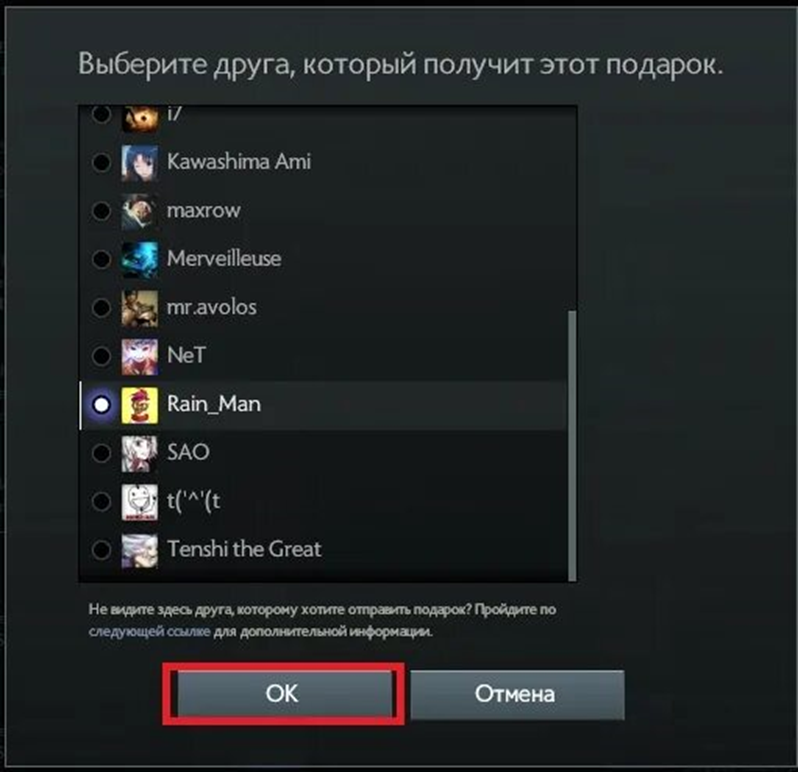
You can check the status of a gift in the "Sent Gifts" section. If sending fails, you will get a notification. Until the recipient accepts the gift it shows "Pending confirmation", and after that "Gift received".
You can also hand over an item through a Steam trade:
Open Steam (the client or the website).
Go to your inventory.
Open the "Trade Offers" section.
Click the button to create a new offer.
Choose the friend you want to send the gift to.
Drag the items you want to give from your inventory into the trade window.
Click "Make Offer": your friend gets a notification and can accept it.
Why a Gift Will Not Send
If an item will not send, the cause is usually one of these:
The friendship is too new. If you added the user less than a month ago, you cannot gift them an item.
Account restrictions. To use all Steam and Dota 2 features, you need to have spent at least $5 on Steam: on a game, an item or a wallet top-up.
The Steam Guard Mobile Authenticator is not enabled. This two-factor protection guards your account against unauthorized access; without it, you cannot send a gift.
The item has a trade or resend restriction. Check the item description in your inventory.
If everything is fine on your side, contact Steam Support.
Trading Items in Dota 2 as an Alternative to Gifting
Besides gifting, you can trade items with other players, offering something they want in return. To trade, first set up your Steam profile:
Open Steam and go to "My Profile".
Click "Edit Profile".
Go to the "Privacy Settings" section.
Set "Inventory" to "Public".
After that, you can trade items with other players. It is also worth setting up your showcase; the guide on how to create a Dota 2 profile walks through it.
To send a trade offer, open the player's profile, choose "Make Trade Offer" in the profile menu and move items from your inventory into the trade window. Then open the partner's inventory tab, add the items you want to receive and send the offer. The player gets a notification and confirms it if the deal suits them.
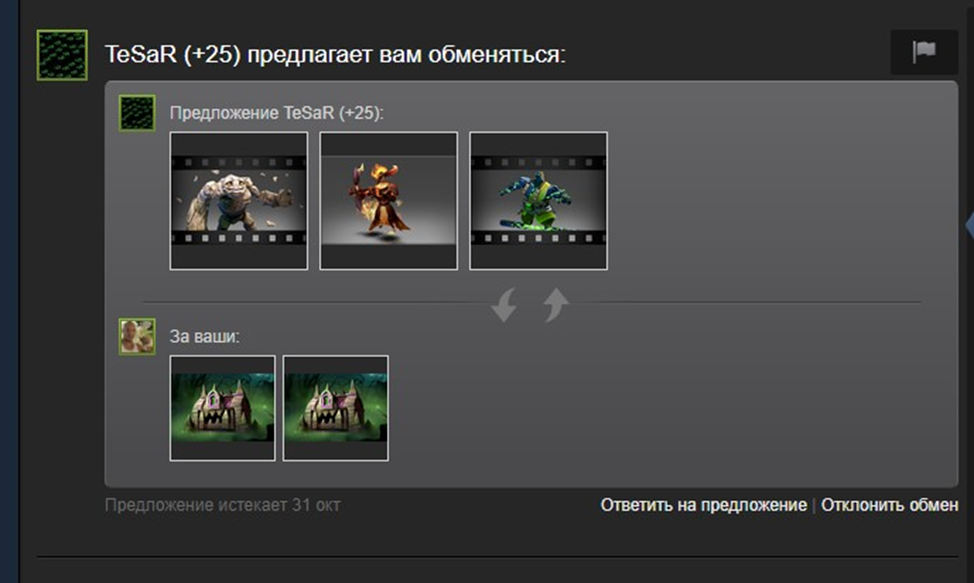
You can find a trading partner in the game itself or on trading platforms. For example, on LIS-SKINS you can buy the Dota 2 item you want and then gift it to a friend, or sell skins you no longer need. More ways to fill your inventory are covered in the guide on how to get skins in Dota 2. When trading with strangers, do not open suspicious links and never share your API key; see what a Steam API scam is for details.
FAQ
Can I gift a skin in Dota 2 to a friend I just added?
No. You can only gift an item to someone who has been on your Steam friends list for at least a month.
Can I cancel a gift in Dota 2?
No, a sent gift cannot be canceled. Check the recipient before sending.
Why is there no "Wrap item as a gift" option?
Most likely the item has a trade or resend restriction, your account does not have the Steam Guard Mobile Authenticator enabled, or the account is limited (less than $5 spent on Steam).
Can I gift a skin in Dota 2 anonymously?
No. The recipient always sees who the gift came from.
