


Due to some features of the new Counter Strike, the question regarding how to remove CS 2 from your computer or in Steam is far from idle. The fact is that CS 2 was released by Valv as a kind of update or addition to CS GO and, in fact, to some extent, “wired” into it. into the body of the original game. Therefore, a relatively small part of kaesers sometimes have problems when they try to free up disk space and remove exclusively files from the second part of the game, and at the same time accidentally affect CS GO files.
These difficulties can be solved; you can remove CS 2 from your device or Steam account in safe ways that do not affect the integrity of CS GO files. Below we will talk about several options and provide you with detailed instructions.
Removing CS 2 from a computer (part 1)
The process takes place in 3 steps, which in total will take 15-20 minutes of your time.
In step 1 you need to complete the following actions:
First of all, game files are removed directly from your device, so you need to find the folder in which they were written. By default, the path to this folder looks like this: C:/Program Files/Steam/steamapps/common/Counter-Strike Source. If during installation you specified a different location for the files, then you will need to either remember where you installed the game, or use the file search of your operating system.
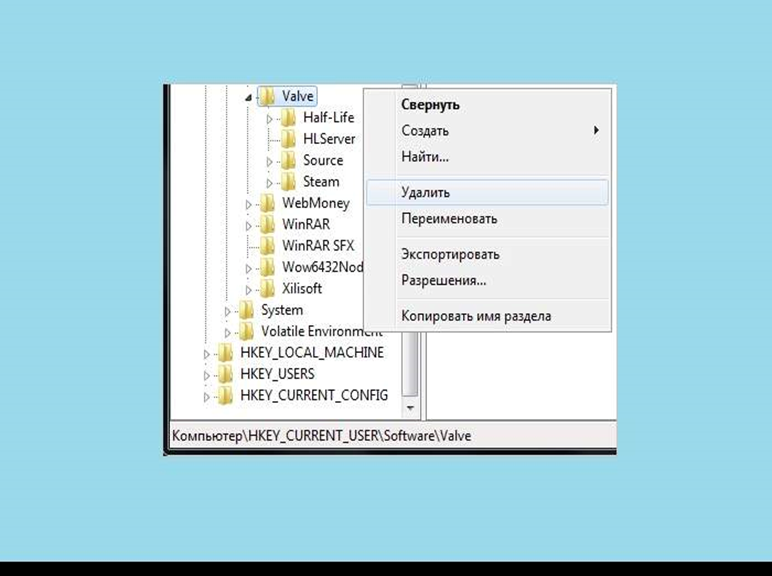
After you have found the folder you are looking for, remove KS 2 from your device. If in the future you plan to re-install the second part of Counter Strike, then it would be advisable to make a backup copy of the game files. This way you will save your favorite settings, configs and, of course, skins.
Removing CS 2 from your computer (part 2)
In the second step, you should clear the Steam cache.
To do this, you will first need to open the Steam client program, and then click on the panel at the top of the screen Steam button. Look for "Settings" and select this item. At the next stage, pay attention to the column on the left, there should be a “Downloads” item, click on it. In the window that opens, look at the bottom of it, there will be a “Clear download cache” button, click on it. You will be asked to confirm the decision, do so. Now you are one step closer to removing CS 2 from your device.
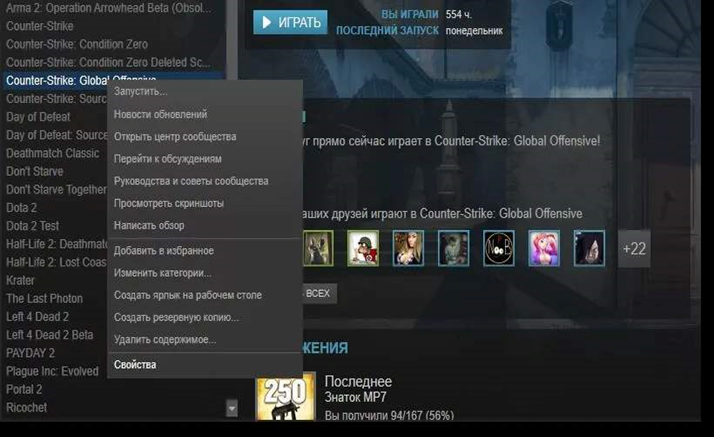
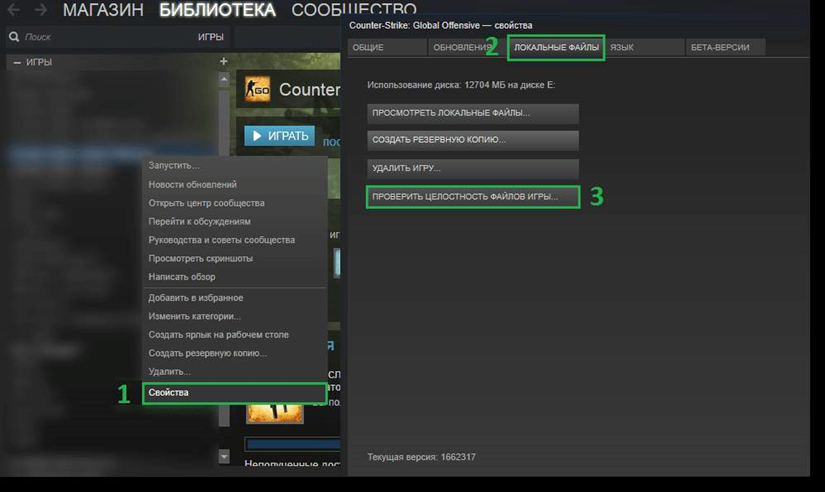
The last step remains, at which you will check whether the game files from CS GO are intact. To do this, you need to return to the main Steam screen and go to the game library. Search for CS:GO in the library, and then open the context menu by right-clicking on the game name. Click on “Properties”, which will open a new window. Among several tabs, find “Local Files”, click on it. You need a button called “Check integrity of game files.” If everything is fine, then congratulations: you have completely removed CS 2 from your device and rolled back CS GO to its original state.
Removing CS 2 from your account Steam
The second part of Counter Strike cannot be removed in the classical way through the library, i.e. right-click on the game name, and then select “Delete”, since the beta version of CS 2 comes as additional content for the original CS GO. Therefore, the sequence of actions in order to remove CS 2 will be as follows:
As usual, launch the Steam client, then select “Library” in the top panel.
Look for CS:GO in the proposed list, click on the name.
Now you will be redirected to the game page. On it you should find “Additional content”, you should go there.
On the additional content page you need to find the CS2 game icon, click on it.
On the page that opens there will be a button “I want to permanently delete this game from my account,” click on it.
Now you will be asked to read the deletion rules, We recommend that you read them carefully. After finishing reading, confirm that you want to delete CS 2 from your account.
Consequences of deleting a new Counter Strike from your account
If you are interested in what will happen to the game files after you erase CS 2 from your Steam account, then do not worry: all of them are yours the files will remain on the device until you decide to delete them manually. The same thing is the other way around: if you delete the files of the new Counter Strike from your computer, this will not affect the game on your account in any way.
The second important consequence: the fact that you deleted CS 2 will not affect your profile and statistics in any way. Simply put, the inventory will not be damaged, all things will remain in it; time information and game achievements will also be saved.
And finally, the most important thing. It doesn't matter if you erase the new Counter Strike, you can always restore it. If you have been given legal access to the beta test, then you have the right to return to it at any time.
Checking the performance of CS GO after deleting CS 2
Consider this option: you have deleted CS 2 from your account, for example, because you are tired of the game, but want to continue playing CS GO. In this case, you definitely need to check the game, whether it starts, whether there are broken files.
To do this, first restart the Steam client, if it was enabled, or open this client. Next, on the main screen at the top, look for “Library” and go there. Carefully check the entire list of games, find CS GO. If everything is fine, the game is in place, then we move on to the next check.
You need to make sure that the game files are intact. To do this, you need to return to the main Steam screen and go to the game library. Search for CS:GO in the library, and then open the context menu by right-clicking on the game name. Click on “Properties”, which will open a new window. Among several tabs, find “Local Files”, click on it. You need a button called “Check integrity of game files.” If everything is in order here, then you removed CS 2 correctly. Let's move on to the final check.
Try go into the game itself, launch one of the maps, for example, with bots, and look at the graphics, display of weapon skins and agents. If there are problems, reinstall the game.
Rumors about the removal of CS 2 by the developers
Various kinds of fakes like this periodically circulate on the Internet: Valv was convinced that the new Counter Strike did not take off, did not gain the popularity that the developers were counting on, so they decided to remove CS 2, not bother with the release of the game and return to the good old CS GO. Various people even post fake news supposedly from Valv, where on behalf of the developers they are refusing to release the game. Please do not take these untrue statements into account. The release of CS 2, scheduled for the summer of 2023, has been postponed, but will definitely take place.
Another concern of the Kaeser community concerns the question of whether Valv will block access to CS GO after the launch of CS 2. Judging by the fact that weapon skins are being tested in the new Counter Strike, and the developers are actively solving problems with transferring inventory from CS GO, apparently, the transition to CS 2 will be complete, and CS GO will go into oblivion.
