


CS2 servers with skins are community servers running a skin plugin: a chat command (usually !ws, !skins, !knife or !gloves) lets you equip any weapon finish, knife and gloves. These skins are visible only on that server, they never reach your Steam inventory and cannot be sold, but they are a convenient way to try an expensive skin in a real match before buying it. The easiest way to find such servers is through server monitoring sites, by the tags in the server name, and you join with the connect command and the server IP in the console.
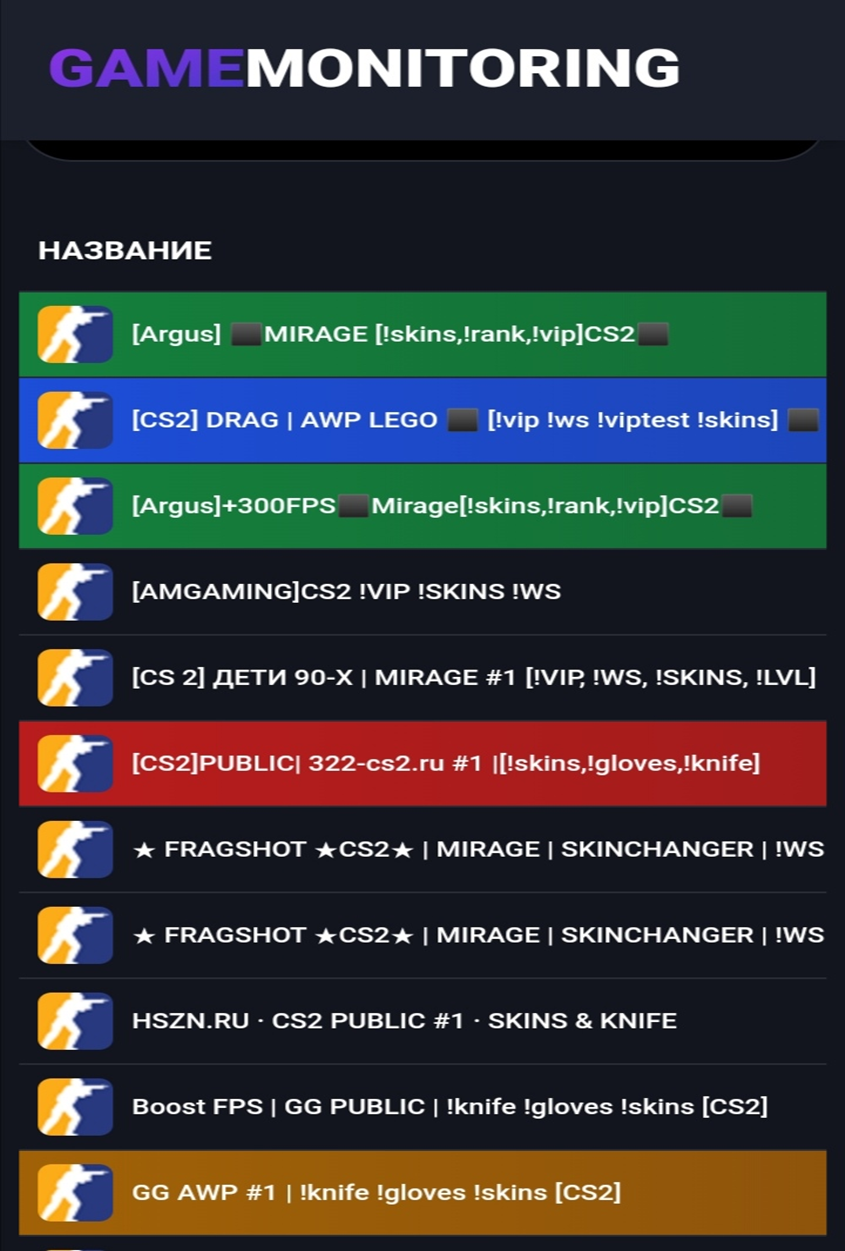
Community servers offer plenty of modes. You can play DeathMatch (DM) to warm up your aim, join AWP servers where everyone has only a sniper rifle, or try maps like AWP Lego. Servers that hand out skins are easy to spot: admins usually add !skins or !ws to the name, and !knife or !knives if knives are available. For a ready-made list, see our picks of the best CS2 public servers with skins.
There is a catch: the choice of skins depends on the admins and the plugin installed on the server. So first, here is a method that lets you build the exact skin you want and use it for the match.
How to Preview a Skin on a CS2 Server: Enabling the Console
Every method below needs the developer console. It is off by default in CS2, so if you have never enabled it:
Launch CS2 and click the gear icon in the top left corner to open Settings.
Go to the Game tab.
Find "Enable Developer Console" and set it to "Yes".
Our separate guide on how to open the console in CS2 covers this in more detail.
How to Preview a Skin on a CS2 Server: Skin Code and !gen

The console opens with the "~" key (you can rebind it).
Type connect (map name).epidemic.gg in the console, for example connect mirage.epidemic.gg, without parentheses, and press Enter. The game will connect you to a server running that map.
Next, open csinspect.com in your browser. It lets you pick any skin, add stickers and generate an item code. Beyond weapons, it also covers gloves and knives, which not every CS2 server with skins offers.
On the main page, click the menu icon (three horizontal lines) and go to Craft. On the next page, click Create new and build the skin piece by piece: weapon, finish, wear and stickers.
When you are done, copy the code. It starts with !gen followed by numbers.
Back in the game, open the chat, not the console. Paste the code and press Enter. If everything is right, the skin appears on the item at once. Keep in mind that third-party sites and server addresses change over time; if this stops working, any server with the !ws plugin will do.
Finding CS2 Servers With Skins
Server monitoring sites such as Gamemonitoring and Monwave list thousands of community servers and show the map, mode, player count and ping. Look for tags in the server name: !skins or !ws for weapon finishes, !knife or !knives for knives, and !gloves or !gl for gloves.
DeathMatch servers are the most common: no teams, instant respawns and a race for kills. Retake servers are close behind, with CTs trying to retake a site after the bomb is planted. AWP servers (map names start with awp_, such as awp_india or awp_lego_2) give everyone only a sniper rifle and a knife. Mirage is the most common map among DM and 1v1 servers.
Joining a Server by IP
Some monitoring sites do not show the IP address in the server list. Click the server name to open its page; the address is usually right under the name or in the info block, in the format 46.174.54.132:27020. Copy it, open the console, type connect followed by the IP and press Enter. If your ping is high, choose a server closer to your region or read our guide on why ping is high in CS2. If no public server suits you, you can create your own CS2 server.
Staying Safe
Servers with !ws and !knife plugins are ordinary community servers: the skins are shown by the server and only exist there. Programs that modify game files to change skins are a different story; they break the rules and can get your account banned, so avoid them. The real risk is scammers asking you to sign in on a third-party site, accept a trade or share your API key. Any Steam sign-in should open the official steamcommunity.com page. If you liked a skin on the server, you can buy the real item on the LIS-SKINS market, or compare finishes first with these ways to preview CS2 skins.
FAQ
Can I get banned for playing on CS2 servers with skins?
These are ordinary community servers, and the skins are visible only on that server. Bans come from third-party programs that interfere with the game, not from joining such a server.
Do skins from the server stay in my inventory?
No. A skin shows only on the server where you selected it; your inventory keeps only the items you actually own.
How do I find a server with knife and glove skins?
Look for !knife, !knives, !gloves or !gl in the server name. Gamemonitoring and Monwave show these tags right in the list.
