


To play CS2 with friends, add them as Steam friends, invite them to a party from the friends list in the game's main menu and queue together. A party holds up to five players, which works for Premier, Competitive, Casual and Deathmatch, while two of you can queue for Wingman (2v2). If you only want to play within your own group, use a Workshop map, your own server or community servers.
Below we walk through each option: how to set up a lobby and what limits it has, how to host your own server, how to play 1v1 and which maps work well for a group.
All Ways to Play CS2 With Friends
There are several ways to play CS2 together with friends:
A party in official matchmaking. You can queue for different modes together: Premier, Competitive, Casual, Deathmatch and Wingman.
Your own map or local server: a Workshop map the host launches on their PC while friends connect to it.
A dedicated server of your own, or a virtual network through Radmin VPN.
Community servers with their own modes, skin plugins and rules, where you can play CS2 with friends outside matchmaking.
Here is each method in more detail.
Official Lobby
A lobby in CS2 is a party of players who queue for a match together. Setting one up is simple: open the friends list on the right side of the main menu, click a friend's name and send a party invite. Once they accept, the lobby is formed, and the party leader starts the search.
You can also join a friend through Steam: open your friends list, right-click their name and choose Join Game. That is handy when your friend is already in CS2 and you have only just opened Steam.
Keep the lobby limits in mind:
A party can have no more than five players. Wingman requires a party of two.
Premier is only available with Prime Status, so every party member needs it. If four players have Prime and the fifth does not, you will not be able to queue for Premier mode or a ranked match. For the price and where to get it, see our article on how much Prime costs in CS2.
If none of your friends are online, you will have to find teammates outside the game. CS:GO had a built-in lobby finder for this, but CS2 does not, so players team up through Steam communities, dedicated groups and Discord servers. Another option is a third-party platform where you can find a team or queue with friends; our guide on how to play on FACEIT in CS2 explains how it works.
To play CS2 with friends on your own map, one player acts as the host: they load a Workshop map or a standard map in practice mode, and everyone else connects through the friends list. Our step-by-step guide on how to launch a map with friends in CS2 covers it in full. To configure the game, the host enters these commands in the console:
sv_cheats 1enables practice commands (infinite ammo, frozen bots and so on);sv_lan 1restricts the server to the local network, which suits a virtual network like Radmin VPN (usesv_lan 0for connections over the internet);sv_password "password"sets a server password; replace the word password with your own.
Creating Your Own Game
You can also run your own dedicated server to play CS2 with friends. It runs separately from your game client, which makes it convenient for both matches and group practice. For more options, see our guide on how to create a server in CS2.
First, look up your router model and find out how to open its settings page in a browser. Then follow these steps:
Forward port 27015 on your router to your PC.
Create a shortcut to cs2.exe in the game folder (game\bin\win64).
Open the shortcut's properties and, in the Target field, add a space after the path to cs2.exe followed by
-dedicated +game_type 0 +game_mode 1 +map de_inferno. You can replace de_inferno with any map.Launch Steam.
Open the shortcut you created: a server window with a console starts.
Launch the game itself, open the console and type
connect localhost. This only works when the server and the game run on the same PC.Go back to the server window and type
status.Find the line with the IP address in the output: your friends need the external address marked public.
Share that IP address with your friends. They join by typing connect and your address into the console, for example connect 123.45.67.89:27015.
Creating Your Own Server via Radmin VPN
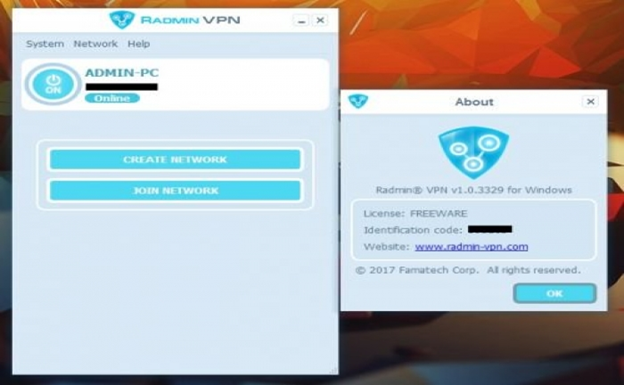
This method is simpler than a dedicated server because you do not need to forward any ports.
Radmin VPN is a free program for creating virtual private networks. Computers in such a network see each other as if they were connected to the same router. To play CS2 with friends through it, follow these steps:
Download Radmin VPN from the official website and install it.
Launch it and open the Network tab at the top of the window.
Choose Create Network and set a network name and password.
Start CS2 and load the map you want to play, for example from the Workshop or with
map de_dust2. Note that the server will have bots by default.
Your friend also installs Radmin VPN, opens the Network tab, clicks Join Network and enters the name and password you set. They then copy your IP address from the Radmin VPN window, launch CS2, open the console and type connect IP, with your address in that network in place of IP.
Joining Community Servers
Community servers are another way to play together. They offer plenty of maps, modes and opponents, and some run skin plugins and their own rules; our article on CS2 servers with skins covers those. If you want a 1v1 duel without setting up a server, do the following:
Open Play in the main menu.
Go to the Community Server Browser.
Filter the list by name, for example "1v1", "duel" or "arena".
Join a server and invite your friend to the same one through the friends list.
Community servers give you more than a wide choice of maps and players. Some keep their own stats and rankings, which make it easy to track your progress.
How to Play 1v1 in CS2
One-on-one duels are good practice that later helps you win gunfights in real matches. The quickest official option for two friends is Wingman, but there you play on the same team against two opponents. To play against each other, you need a private server or your own map. That gives you full control over the settings: mode, map and console commands.
For a private duel:
Enable the developer console in the game settings (Game tab); after that it opens with the "~" key.
Choose the map where you will play CS2 with your friend. Any standard map works, as does a 1v1 duel map from the Steam Workshop.
Set up the server for two players.
mp_roundtimechanges the round length,mp_freezetimesets the freeze time at the start of a round, andmp_warmup_endends the warm-up.Remove the bots so nothing distracts from the duel: type
bot_kick.
Other commands come in handy for 1v1 games with a friend too: mp_restartgame 1 restarts the match, and mp_buy_anywhere 1 lets you buy anywhere on the map.
Fun Maps to Play With Friends
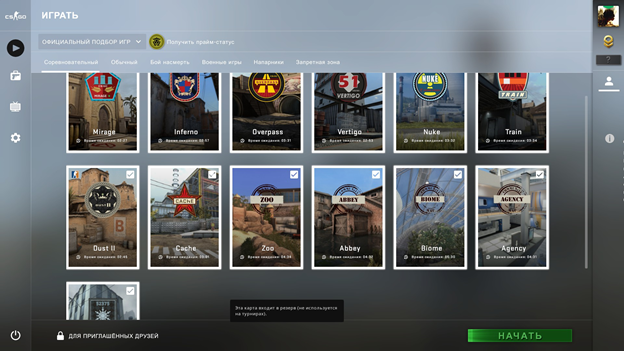
Community Workshop maps are a good fit for group sessions. Many of them were originally made for CS:GO, so check that a CS2 version exists before you play:
Railway. The story has you hired to break into a Parker rail yard and steal contraband while the police are already on site. Recommended for 2 to 6 players.
M.p.g.w. (Horror). A horror-themed puzzle map for up to 3 players.
Zombie Survival. A survival map against waves of zombies.
Truck Wars. A map inspired by Mad Max for anyone who wants to play CS2 with friends and race different vehicles.
Tips for Playing CS2 Together
To get the most out of playing with friends, keep a few rules in mind:
A shared strategy. Every player should understand the team's overall goals. Talking through the plan before the match makes the team more coordinated and quicker to decide during a round.
Communication. Use voice or team chat. Good communication means not only timely, accurate callouts but also listening to others and responding calmly to their ideas.
Clear roles. Agree on who takes the AWP, who enters the site first and who watches the flank: fewer stacked positions means fewer lost rounds.
Steady improvement. Review mistakes after matches and practice together, for example on your own map with bots.
FAQ
How many friends can join a lobby in CS2?
A party holds up to five players. Wingman takes two, and for bigger groups use your own map, a server or community servers.
Can you play CS2 with a friend without Prime?
Yes, in casual modes and on your own maps. For Premier, every party member needs Prime, otherwise the queue will not start.
How do you play with a friend against bots in CS2?
Load a map in practice mode or from the Workshop, invite your friend through the friends list and add bots with bot_add_ct or bot_add_t.
How do you play 2v2 with a friend?
Form a party of two and pick Wingman: you will be on the same team against two opponents on smaller maps.
