


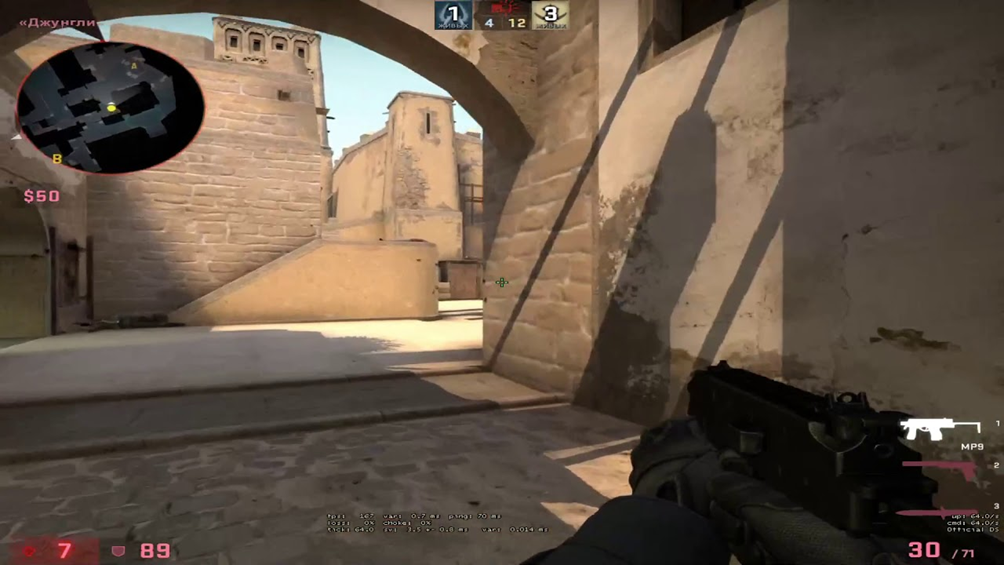
To set Delight's crosshair in CS2, copy the code CSGO-fKf3c-HaqvJ-pTknR-ES4aj-MxkoE, open Settings, then Game, then Crosshair, click "Share or Import", paste the code and confirm with "Import". It is a static yellow crosshair (red 255, green 255, blue 0) with an outline, no center dot and no recoil following: line length 1.5, thickness 0, gap 2. Below we go through every parameter, his config, binds and mouse settings.
Delight is a well-known Russian-speaking CS content creator. Originating from the Kazakh city of Shymkent, on February 6, 2016, he created the Delight channel on YouTube. By the beginning of August 2024, it boasts 1.3 million subscribers. Videos posted by Maxim Saenko gather between 200-300 thousand views. For a long time the channel focused on reviewing Overwatch cases in CS:GO. You can also find stories about:
tournaments;
maps;
skins;
innovations in gameplay;
digital equipment used.
Delight's Crosshair Code and Parameters
The code CSGO-fKf3c-HaqvJ-pTknR-ES4aj-MxkoE enables the crosshair (share codes in CS2 still start with CSGO-). Behind this short string is a full set of parameters. Delight prefers a traditional static style for crosshair design. He strongly dislikes a trembling image that changes sizes. He also keeps the friendly fire warning on rather than disabling it, as less experienced players often do. Meanwhile, he consistently disables following recoil. A central aiming dot is also unnecessary for him.
Other important parameters typical for the Delight crosshair in CS2:
line length 1.5;
stripe thickness 0.0;
gap between sections — 2.0.
Outlining is used in mandatory mode; without it, it's impossible to achieve high clarity in aiming. The red color is set to 255, as is green, while blue is assigned a zero value. Alpha is also set to 255, so the crosshair is fully opaque. A T-shaped aiming device is not needed. The gap size is made independent of the selected weapon.
How to Install Delight's Crosshair in CS2
The simplest way to connect the necessary setting is to import the code. For this purpose, one must go to the settings panel, clicking the gear icon in the upper left corner of the screen. Then select the blocks sequentially:
"Game";
"Crosshair";
"Share/Import".
In the popup window, insert the necessary sequence of characters. All that remains is to press the "Import" button, and the crosshair changes right away. More on the settings themselves in our guide on how to create a crosshair in CS2.
It is also possible to set the Delight crosshair in CS2 independently, by setting the required parameters. Just in case, it's advised that the outline must be set, otherwise, it will be impossible to reproduce the playing style of Maxim Saenko. It is recommended to keep backup copies during any experiments, otherwise, it would be problematic to revert to the previous configuration in case of issues.
Delight's Config (2022 Version)
Like any other player, our hero is constantly in search of optimal solutions. And his "favorite sight" is also actively adapted to changing requirements. Below is the config the creator published back in May 2022, in the CS:GO era; in CS2 it is installed the same way, just into a different folder. The sequence of actions:
download the file from the link;
after receiving it, copy it to Steam\steamapps\common\Counter-Strike Global Offensive\game\csgo\cfg (this is the CS2 folder; in CS:GO the path had no "game");
type the command exec delight in the console;
fill in the necessary parameters for launch;
add the item +exec "delight", because without this indication the crosshair will be disrupted by a grenade throw and will not return to its normal state by itself.
Delight listed these launch options: +exec "delight" +mat_queue_mode 2 +cl_forcepreload 1 +fps_max 300 -novid -console -language english -refresh 240. This is a CS:GO set: mat_queue_mode and cl_forcepreload belonged to the old engine and should not be relied on in CS2. The -refresh 240 option sets a 240 Hz monitor refresh rate.
Delight's Binds
The third mouse button is used for tagging, the fourth drops C4, and through the agency of the fifth, a Jumpthrow bind is created. The MWHEELDOWN command allows for a jump. If a player needs to throw a smoke grenade at a spotted target, they press the C button, and by command X, a flashbang is extracted. When it's necessary to use a Molotov cocktail, the Z button comes into play. To mute the opposing team, they press J. With N, they start to fly, thanks to K it is easy to zoom in the radar, and H is used if the basic volume does not satisfy the gamer. If you want to hold the knife in the left hand like Delight, use these binds (more on the command in our guide on how to switch to the left hand in CS2):
cl_righthand 1;slot1;
cl_righthand 1;slot2;
cl_righthand 0;slot3;
cl_righthand 1;slot4;
cl_righthand 1;slot5.
A second version of his crosshair code also circulates: CSGO-D3qXz-JdKyK-uDC4d-yn89L-a7LsE.
Weapons
Buy binds deserve a separate mention. They are assigned to numpad keys (KP with an underscore and the key name) and the arrow keys. The designations for purchasing are not entirely obvious. Thus, the INS command signifies the acquisition of Tec-9/Five-SeveN. Those wishing to acquire AK47/M4A4 + Armor should use the END indication. Other important order options:
body armor — SLASH;
Molotov cocktail — DEL;
armor kit with helmet — UPARROW;
AWP + Armor — DOWNARROW.
When deciding to order AK47 or M4A4, use the LEFTARROW setting. SSG08 is available after indicating PGDN, and acquiring grenades is allowed by command 5. To note: if you wish to buy 2 grenades at once, use the RIGHTARROW option. The famous "Desert Eagle" and a set of ammunition for it will be available upon using the command PGUP.
The external appearance of the device
Whether you use Delight's crosshair or any other, the setup occurs according to the same principles. Currently, three types are distinguished: dynamic — movement occurs both while walking and shooting; hybrid — the aiming device moves only when shooting; static — nothing moves and it sits perfectly still. The choice of a central point or its absence is a matter of personal preference.
Such a parameter as length refers to the "sticks" out of which the crosshair is composed. The thickness index determines how thick these lines will appear, and the gap separates them. When setting the outline, you can not only enable or cancel it, but also adjust the thickness of the highlighting.
Color in the RGB system is traditionally created from:
red;
green;
blue tone.
To note: if the value 255 is set for all three parameters, a simple white tone is obtained. Transparency of the Delight crosshair or any of its replacements is separately regulated. For this purpose, the "Transparency (Alpha)" indicator is intended. CS2 added a Follow Recoil option: while you hold the fire button, the crosshair moves away from the center of the screen with the recoil. Delight keeps it off.
How to adjust properly
While being charmed by the achievements of top cyber athletes, the ordinary player should not forget about the difference in their own method and style of play. This is especially important when people try to copy the successes of Delight, who are not even planning to participate in top-tier tournaments.
Following the crosshair with the weapon might seem like a good idea. However, the option mostly helps beginners. Experienced players easily learn the spray patterns of each type of weaponry and can manage without additional hints.
The fact that the Delight crosshair in CS2 is static is no accident. Almost anyone who has played with dynamics eventually stops striving for complete realism in gameplay. Yes, in reality, everything always fluctuates, but on the screen, there are its own laws, and it is important to inflict effective fire damage on enemies, even if it seems implausible. However, do not forget about recoil, and then each shot made will be maximally damaging to the enemy.
How to avoid mistakes
Sometimes players fear that when using someone else's aiming method, whether set in the settings or coded, gross misses will occur, something will work incorrectly. In CS:GO, players used the crashz crosshair generator v4 map for this; in CS2 the crosshair is visible right in the settings preview, and the best check is still shooting bots, during which the gamer will immediately assess how the Delight crosshair in CS2 behaves during movement or while spraying.
Ready-made crosshairs of well-known players are collected in our list of the best CS2 crosshairs. Professional devices (and the variant being discussed is no exception) are small because this helps save space on the screen but does not hinder careful aiming at an enemy suddenly jumping out. Even grandmasters rarely use a central point, but some pros cannot imagine their matches without it. If you do not know how to open the console, see our guide on how to open the console in CS2.
A bit about the equipment used
No matter how talented the player is, no matter how carefully the Delight crosshairs in CS2 are adjusted, strictly adhering to the original version or adapting it to their own tastes and tasks, much also depends on the computer equipment.
Saenko prefers to play with a mouse set at DPI 1000-1200: it's immediately clear that his approach is quite flexible and not limited to specific figures. His mouse polling rate is 400 Hz. Other important settings:
sensitivity 1.54;
zoom sensitivity — 1.07;
sensitivity in general Windows settings 12 out of 20.
zero acceleration (this is important because it allows eliminating any unevenness in actions on the fields of screen battles).
Feeling the advantages of the Delight crosshair in CS2 will also be problematic with improper video settings. The optimal video mode is a resolution of 1920x1080 with a widescreen picture updating at a speed of 240 Hz.
Additional recommendations
Not every beginner knows that cl_crosshaircolor 4 makes the crosshair cyan, while the value 5 enables a custom color set with cl_crosshaircolor_r, _g and _b (this is how Delight's yellow crosshair is configured). For precise grenade lineups you can enter the sequence alias "xhair" "cl_crosshairsize 1000000; bind l xxhair" alias "xxhair" "cl_crosshairsize 2.5; cl_crosshairgap -2.5; bind l xhair"
bind l "xhair". You can replace the L key with any key you like: one press stretches the crosshair across the screen to line up a throw, the next press returns it to normal. To avoid having to enter all this anew before each session, create a file named crosshairsmoke.cfg in C:\Program Files (x86)\Steam\steamapps\common\Counter-Strike Global Offensive\game\csgo\cfg and paste all three commands into it line by line. For this to work, after starting, head to the console and enter the command exec crosshairsmoke.cfg.
If you want to experiment further, look at the crosshairs of donk, m0NESY and s1mple. Keep in mind that a crosshair is only a tool: results come from the right weapon choice and regular practice.
