


The need to understand how to find out IP in CS:GO can appear for various reasons. After reading this article, you will learn how to find the server's IP and understand what it can be useful for. Every place on the internet has its own IP, whether it's some service, a game server, or the site you're reading this on. It is a sequence of numbers and indicates the exact location of the server to which it can be accessed.
Usually, internet users do not have to think about IP addresses – to get to a site, it is enough to remember the name of the internet page, its text address or simply find the link through a search engine. But if you want to go to a particular CS:GO server, you can't do it without its address. This comes in handy, for example, to invite friends to the server you're currently playing on. Sometimes it is necessary to find out the server IP in CS:GO to deal with technical problems, such as too high ping.
How to See the IP of the Server in the Game
The easiest way to find out the IP of the server in CS:GO during the game is to use the status command. To do this, go to the console and type the command «status». Several lines of information will appear, including the server data you need. Copy the whole sequence of numbers and send it to your friend so that he can log in (keep in mind that this does not work in all modes – in some of them you can only log in through the lobby).
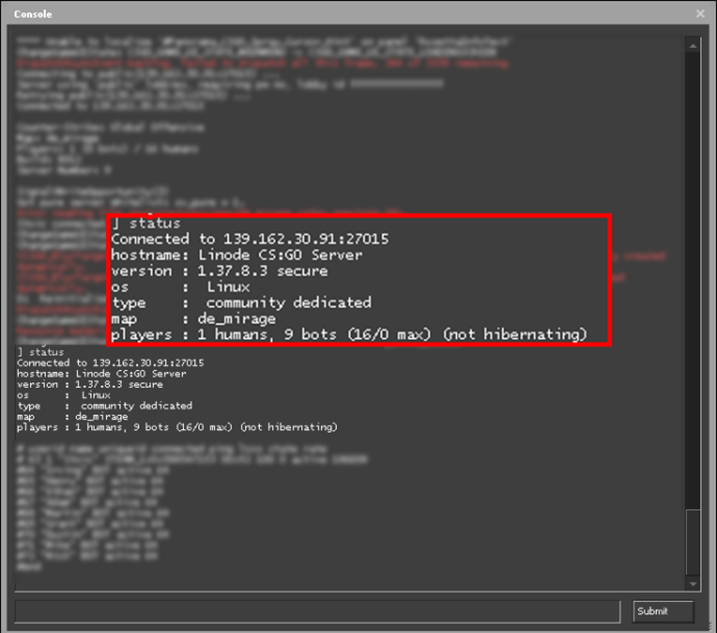
Of course, this will only work if you are currently connected to the server. If you did not look at the address, there is a chance that later you can find it in the tab «History» – there appears a list of servers on which you have recently played.
Once you know the IP of the server in CS:GO, you can save its address in Steam, so that next time you do not have to look for it again. To do this, select the «Servers» option from the «View» menu and add the server whose address you just figured out to the list.
How to Get Into the Console to See IP
In case you don't know how to get into the console, here's how to do it:
Open the settings menu.
In the settings window, click on the tab «Game».
Find the parameter «Enable Developer Console» and set the switch to «Yes».
In the game, to enable the console, press the key «~» (in the Russian layout this is the letter ё). If desired, the button to open the console can be changed in the control settings.
Now you can at any time turn on the developer console and enter service commands, such as «status», to find out the IP of the server in CS:GO.
Why You Need to Know the Server IP
To play in the usual matchmaking, you do not need to know the server IP – you can just connect to the game. You may need to check the IP to play on community servers. If you already have the desired address saved, open the console and enter the command connect followed by the appropriate sequence of digits.

The second way is to use the item «Community Server List» in the main menu, instead of entering through official matchmaking. In the window that appears, click «Add Server» and enter the appropriate data. It is convenient that the list of servers is saved, and you do not have to figure out every time how to find the IP of the server in CS:GO – addresses that have been used previously will be saved in favorites.
What Are the Server Types in CS:GO
With the help of the list of community servers, you can not only go to servers that you already know but also find new ones. However, their names can be confusing, so it's useful to know what types of servers are most common and what the abbreviations mean.
DM – Deathmatch servers. Variants include HSDM (headshots only), FFADM (free-for-all), AWP DM or Pistol DM (weapon-limited modes).
IDLE – servers where each map is played for one round only. Used to farm item drops.
BH (Bunny Hop) – servers for movement/jump-based maps. RJ (Rocket Jump) – similar, but with shooting mechanics.
SURF – servers focused on surfing/obstacle movement rather than combat.

Where Else to Look for Server IPs
There are many modified servers besides official ones. If you've memorized how to find the IP in CS:GO, you can revisit your favorite servers any time. Apart from the in-game list, you can also search for servers using catalog sites.

You can usually sort the list by slot count and game type to find what you need. The ability to search and enter servers by IP is helpful for practice or fun – whether you're working on map strategy or playing zombie/hide-and-seek modes.
Now you know how to find out the IP of a server in CS:GO and what to do with that information. This will help you join the right servers, play with friends, and enjoy the game even more. And to make things even more exciting, we offer the best weapon skins at the best prices on Runet.
