


m0NESY's CS2 settings are carried over almost entirely from CS:GO: 1280x960 at a 4:3 aspect ratio on a 240 Hz monitor, most graphics options on low, 400 DPI with 2.3 in-game sensitivity (920 eDPI) and a small yellow crosshair with no dot. Below are all of his known settings, from graphics and monitor to mouse, crosshair, viewmodel and NVIDIA driver options, with console commands you can copy.
Ilya "m0NESY" Osipov, a Russian AWPer, joined G2 Esports in 2022 and has become one of the most productive snipers on the scene. Pros adjust their configs from time to time, and settings are always a matter of personal preference, so treat the values below as a proven starting point rather than a recipe.
m0NESY's Monitor and Graphics Settings
m0NESY plays in fullscreen mode at 1280x960 with a 4:3 aspect ratio and brightness at 80%. His monitor runs at 240 Hz. Not every monitor supports that refresh rate, but for a sniper, a smooth image in fast duels matters a lot.
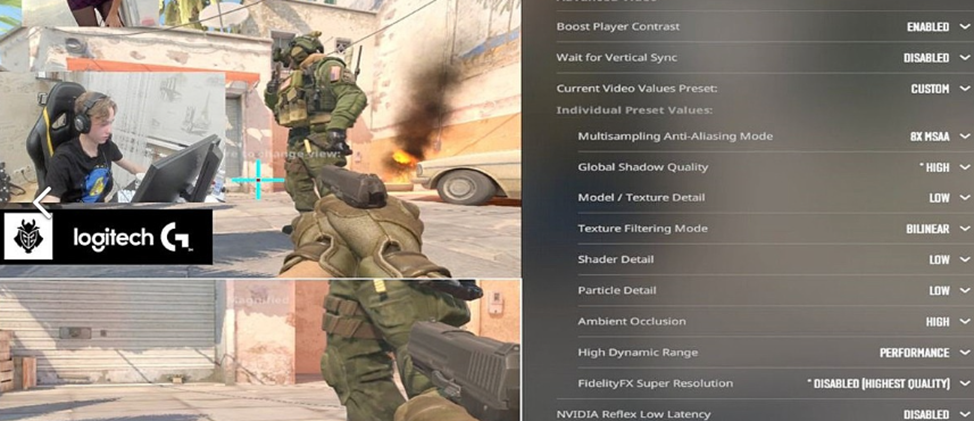
He sets most graphics options to the lowest level, which he says keeps the game as stable as possible. Shadows and anti-aliasing are the exceptions: high shadow quality helps spot opponents by their silhouettes earlier. He uses an NVIDIA graphics card.
m0NESY's graphics settings in CS2:
Boost Player Contrast: off;
Wait for Vertical Sync: off;
anti-aliasing mode: 8x MSAA;
global shadow quality: very high;
shader detail: low;
particle detail: low;
ambient occlusion: off.
His CS:GO-era config also listed motion blur and multicore rendering. Those are CS:GO options: CS2's video settings have no separate toggles for them. His approach to graphics is close to s1mple's. If your PC is on the weaker side, see our CS2 settings for weaker computers.
m0NESY uses a 24.5-inch BenQ ZOWIE XL2546K. The monitor has a matte anti-glare coating and DyAc, a technology that reduces motion blur.
He keeps DyAc turned off. The common explanation is that it keeps him used to an image that does not depend on one specific monitor, since tournament organizers provide different equipment.
m0NESY's CS2 Settings: Mouse and Sensitivity
m0NESY plays with a wireless Logitech G Pro X Superlight 2. For a sniper, sensitivity is especially important: it decides how precisely you can bring the AWP crosshair onto a target in one motion.
The mouse values he has settled on over his career:
in-game sensitivity: 2.3;
DPI: 400;
eDPI: 920;
mouse acceleration: off;
Windows pointer speed: 6;
zoom sensitivity: 1;
polling rate: 2000 Hz.
There is nothing unusual in these numbers: 920 eDPI sits in the typical range for pros. m0NESY leaves zoom sensitivity at the default value of 1, where the view already moves slower in the AWP scope because of the magnification. He explains it this way: with a scoped rifle you do not need to sweep left and right, the job is to hold one angle cleanly and shoot, and a slower scoped speed helps place the crosshair precisely.
m0NESY's Crosshair
m0NESY has changed his crosshair between events, but the core idea stays the same: a small static crosshair with no dot and no outline. The values of his last known version:
style: classic static (lines do not move while running or shooting);
color: yellow;
center dot: no;
outline: no;
alpha: 253 out of 255, so it is practically opaque;
length: 2;
thickness: 0;
gap: -3;
gap follows weapon: no;
sniper crosshair width: 1.
To set this crosshair, enter this block in the console:
cl_crosshair_drawoutline 0; cl_crosshairalpha 253; cl_crosshaircolor 2; cl_crosshaircolor_b 255; cl_crosshaircolor_g 255; cl_crosshaircolor_r 255; cl_crosshairdot 0; cl_crosshairgap -3; cl_crosshairsize 2; cl_crosshairstyle 4; cl_crosshairthickness 0; cl_crosshair_sniper_width 1;
How to import the crosshair with a share code, and how his versions from different events differ, is covered in our guide on how to set m0NESY's crosshair in CS2.
Hand Position
m0NESY's viewmodel is compact: the weapon model sits toward the edge of the screen and barely blocks the view, so his attention stays on the map. The values are a viewmodel FOV of 68 and X, Y and Z offsets of 2.5, 0 and -1.5. To apply them, enter this in the console:
viewmodel_presetpos 3; viewmodel_fov 68; viewmodel_offset_x 2.5; viewmodel_offset_y 0; viewmodel_offset_z -1.5;
CS:GO-era versions of this line also included cl_viewmodel_shift_left_amt and cl_viewmodel_shift_right_amt. Those worked in CS:GO but do not exist in CS2. What each viewmodel command does and how to find your own values is explained in our guide on how to set up hands in CS2.
m0NESY's NVIDIA Graphics Card Settings for CS2
m0NESY has said there are no special tricks in his NVIDIA Control Panel, with one exception: Anisotropic filtering set to 16x in the 3D settings, which makes textures look sharper. For the rest of the panel, follow our guide on how to set up the NVIDIA Control Panel for CS2.
He also says he keeps no aliases in his autoexec: such scripts are banned at tournaments, so there is no point in getting used to them. The commands from this article are worth saving in an autoexec file so you do not have to retype them after a reinstall: see how to install a config in CS2.
Settings in CS2 are a purely individual matter: what works perfectly for a top player may feel wrong to you. Find your own values by testing different options and combinations, and use m0NESY's config as a baseline. If you want to match his inventory as well, see the skins m0NESY uses, all available on LIS-SKINS.
FAQ
What are m0NESY's graphics settings in CS2?
1280x960, 4:3, fullscreen, 80% brightness. Shader and particle detail on low, shadows on very high, 8x MSAA, with vertical sync, ambient occlusion and Boost Player Contrast turned off.
What sensitivity does m0NESY use?
400 DPI and 2.3 in-game sensitivity, which is 920 eDPI. Zoom sensitivity is 1, acceleration is off and the polling rate is 2000 Hz.
What crosshair does m0NESY use?
A small yellow classic static crosshair with no dot and no outline: length 2, thickness 0, gap -3. The console commands are in the crosshair section above.
What are m0NESY's viewmodel settings?
viewmodel_presetpos 3, viewmodel_fov 68, viewmodel_offset_x 2.5, viewmodel_offset_y 0 and viewmodel_offset_z -1.5. Enter them in the console on one line.
